There is a phrase you cannot avoid right now: AI agents. Investors are funding them, companies are announcing them, and developers are building them. But ask most business owners what an AI agent actually does, and you get a vague answer about "automation" or "smart AI."
This post gives you a clear, plain-English explanation of what AI agents are, how they work, five real business use cases that are running in production today, and an honest checklist for whether building one makes sense for your company right now.
What Is an AI Agent?
An AI agent is software that can look at information, decide what to do next, take action using the tools available to it, and then check whether the result was what it needed. It repeats that loop until the task is finished or until it needs a human to step in.
The word "agent" comes from "agency," meaning the ability to act on your behalf.
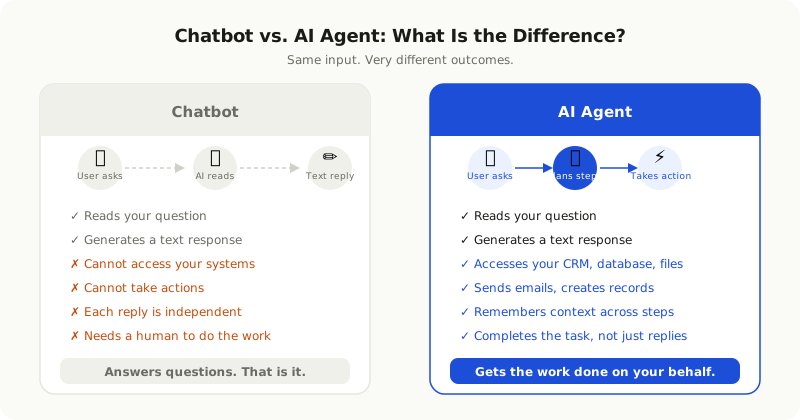
Here is the simplest way to understand it: a regular chatbot answers your question and stops. An AI agent reads your question, looks up your order in the database, sends you an updated shipping confirmation, logs the action in your CRM, and only routes you to a human if the issue needs judgment that the agent cannot handle.
One input. Many actions. One completed task.
How an AI Agent Actually Works
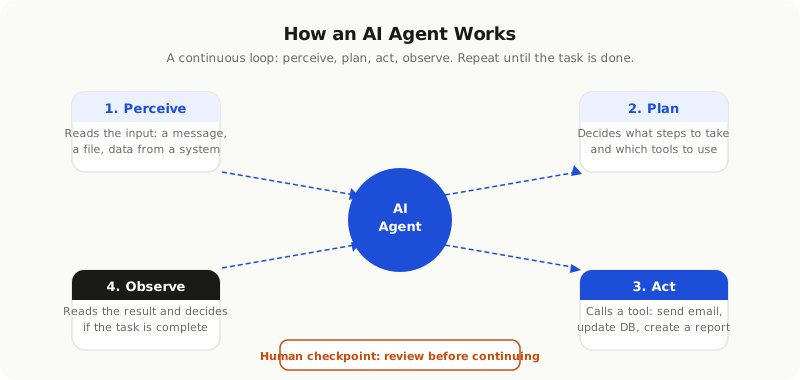
The mechanics are simpler than they sound. Every agent runs a loop with four steps.
**Perceive:** The agent reads its input. This could be a user message, a database query result, a calendar entry, a file, or data from an API.
**Plan:** The AI model looks at the input and decides what to do next. It might decide to look something up, send a message, or ask the user for more information.
**Act:** The agent uses a "tool" to carry out the action. Tools are things like: send an email, query a database, create a calendar event, call an API, or write a file.
**Observe:** The agent reads the result of its action and decides if the task is done, if it needs to take another step, or if it is stuck and needs a human.
This loop continues until the job is complete.
The key difference between a simple automation script and an AI agent is judgment. A script follows fixed rules. An agent can decide which step to take next based on what it finds.
The Difference Between a Chatbot and an AI Agent
This is the question that causes the most confusion, so here is a direct comparison.
| Feature | Chatbot | AI Agent |
|---|---|---|
| Responds to messages | Yes | Yes |
| Takes actions in other systems | No | Yes |
| Handles multi-step tasks | No | Yes |
| Uses tools (email, CRM, database) | Rarely | By design |
| Remembers context across steps | No | Yes |
| Completes the task without a human | No | Often |
A chatbot is a front-end for a conversation. An AI agent is a worker that uses conversation as one of many inputs and outputs.
5 Real Business Use Cases for AI Agents
Customer Support That Resolves Issues
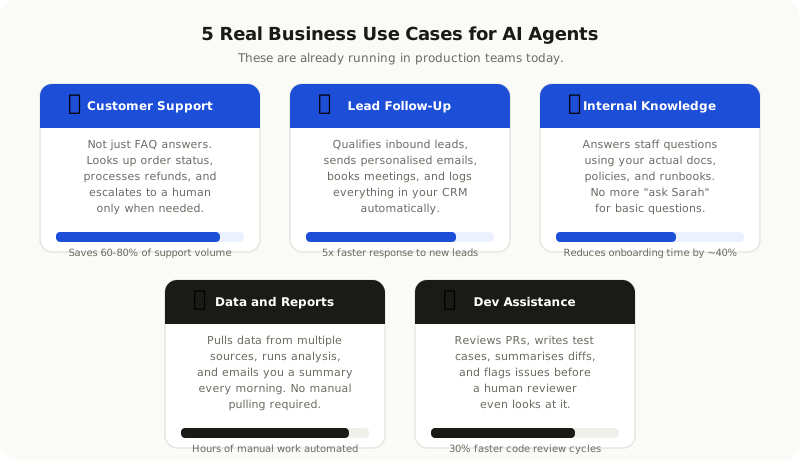
Most support chatbots are essentially FAQ pages with a chat interface. They answer questions and that is it. An AI agent connected to your order management system, refund platform, and ticketing system can actually resolve issues. It looks up the order, checks the eligibility, processes the refund, and sends a confirmation. It escalates to a human agent only when the situation requires judgment it cannot handle. Teams that have built this properly report handling 60 to 80 percent of their support volume without a human touching it.
Lead Qualification and Follow-Up
The speed at which you follow up with a new lead directly affects your conversion rate. An AI agent can respond to a new enquiry within seconds, ask qualifying questions, check whether the lead fits your target profile, schedule a discovery call with the right person on your team, and log everything in your CRM. No lead falls through the cracks because someone was busy.
Internal Knowledge Assistant
Every company has knowledge locked in documents, Notion pages, Confluence wikis, old email threads, and the heads of senior employees. An AI agent connected to these sources can answer employee questions using the actual content of those documents. Not a hallucinated guess. Your real policies, your real runbooks, your real processes. This is especially valuable for onboarding new team members who would otherwise ask the same questions repeatedly.
Automated Data Analysis and Reporting
If your team spends time every Monday morning pulling numbers from multiple places and pasting them into a report, this is a strong candidate for an agent. The agent can pull data from your analytics platform, your CRM, your ad accounts, and your database, run the analysis, and email you a plain-English summary every morning. Hours of manual work, automated.
Software Development Assistance
Development teams are using AI agents to review pull requests before a human engineer looks at them, generate test cases from function signatures, summarise changes in a diff, and flag common issues like security vulnerabilities or missing error handling. This does not replace the engineer's judgment but it catches the obvious problems and frees up review time for the things that actually need human thinking.
When Does Building an AI Agent Actually Make Sense?
Not every process needs an agent. Here is how to think about it honestly.
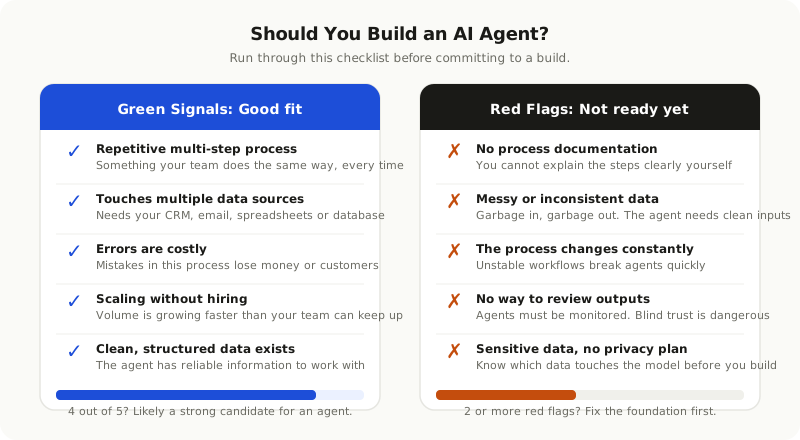
You are in a good position to build an agent when:
- The process is repetitive and multi-step. Your team does the same sequence of actions regularly, and it is predictable enough to describe clearly.
- The process touches multiple systems. It needs to access your CRM, send an email, update a database, or call an API. If it only involves one tool, simpler automation may be enough.
- Errors have a real cost. Mistakes in the process lose money, disappoint customers, or waste significant time.
- Volume is growing faster than your team. You need to scale the process without scaling the headcount at the same rate.
- You have clean, structured data. The agent needs reliable information to work with. Messy inputs produce unreliable outputs.
You are probably not ready yet when:
- You cannot clearly describe the steps of the process yourself. If the person doing it makes judgment calls that are hard to articulate, the agent will struggle.
- The process changes frequently. Building an agent for a workflow that will look different in three months is a waste of effort.
- You have no way to review the agent's outputs. An agent running without any oversight is a risk, not an asset.
- Sensitive data is involved and you do not have a clear plan for privacy. Before any customer or business data touches an AI model, you need to understand what that means for compliance.
What It Actually Takes to Build One
Understanding the components helps you have a better conversation with whoever builds your agent, whether that is an internal team or an external partner.
**Clear task definition.** This is the most important step and the one most often skipped. The scope of what the agent does must be explicit. "Handle customer support" is not a task definition. "Respond to order status enquiries, check against the order management API, and issue refunds for orders under 14 days old that match our return policy" is a task definition.
**Tool connections.** Every action the agent takes requires a connection to the relevant system. Email, CRM, database, calendar, internal APIs. Each of these requires integration work.
**Model and orchestration choice.** The AI model (GPT-4, Claude, Gemini, or others) handles the planning and language. An orchestration framework (like LangChain, LlamaIndex, or a custom layer) manages the loop. These choices affect cost, latency, and capability.
**Human-in-the-loop checkpoints.** Well-built agents know when to stop and ask for human input. Defining those checkpoints is part of the design, not an afterthought.
**Monitoring and iteration.** Agents need to be watched. You need to know how often they complete tasks successfully, where they fail, and what the failure costs. The first version of an agent is rarely the final version.
The Risks to Know Before You Start
AI agents are powerful tools. They are also a new category of software with specific risks that traditional automation does not have.
**Hallucination acting on real data.** AI models can be confidently wrong. If an agent makes a decision based on incorrect information and that decision updates your database or sends an email to a customer, the consequences are real. Strong tool design and checkpoints reduce this risk but do not eliminate it.
**Cost overruns from poor scoping.** Agents that loop too many times or call expensive APIs repeatedly can generate unexpected costs. Scoping the task well and setting hard limits on tool usage is essential.
**Over-reliance without oversight.** The risk is not that an agent will go rogue. The risk is that your team stops checking its outputs because it has always been right, and then a failure happens that nobody catches.
**Data exposure.** Every piece of information you pass to an AI model is data that leaves your system. Know exactly what data your agent is sending and to which model, and make sure it complies with your privacy commitments and any applicable regulations.
Start With a Single Process
The teams getting the most value from AI agents are not trying to automate everything at once. They pick one process that is clearly scoped, high volume, and low risk if something goes wrong, and they build the agent for that specific job. They measure it, improve it, and then expand.
A useful starting question is: "How many hours per week does my team spend on a process that follows a predictable pattern?" If the answer is more than a few hours, it is worth mapping the steps and having a conversation about whether an agent could handle it.
AI agents are not a magic button. But when they are scoped properly and built with care, they can replace entire manual workflows and free your team to do work that actually requires human judgment.