When a client asks "should we build an app?", the first question we ask back is: "Do you actually need a native app?" That one question shapes everything. It decides your development cost, your time-to-market, and how your users will find and use your product.
Progressive Web Apps (PWAs) and native apps are not competing technologies fighting for the same job. They solve different problems for different audiences. Picking the wrong one can waste months of development and real money. This guide gives you the full picture so you can make a confident decision.
What Is a Progressive Web App?
A Progressive Web App is a website that looks, feels, and behaves like a mobile app. You build it using standard web technologies (HTML, CSS, JavaScript), and users open it through a browser. But unlike a regular website, it can work offline, send push notifications, and be installed on a phone's home screen without ever visiting an app store.
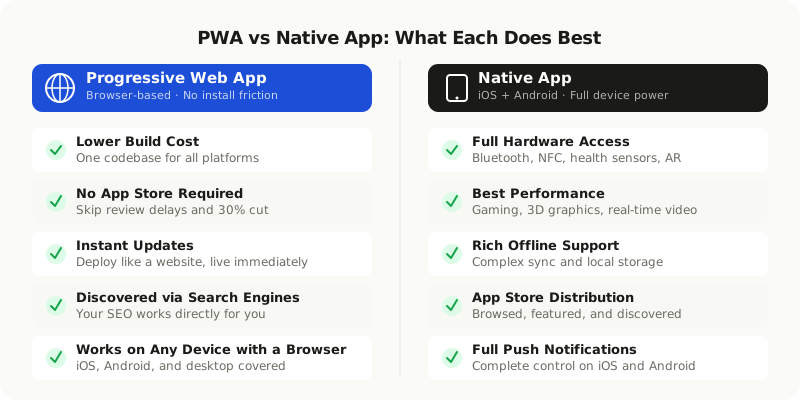
Some well-known PWAs include Twitter Lite, Starbucks, and Pinterest. They serve millions of users every day without a single App Store download required.
Here is what a modern PWA can do today:
- Work offline using service workers and cached data
- Send push notifications (full support on Android, partial on iOS 16.4 and newer)
- Be added to the home screen with one tap, with its own icon
- Access the camera, microphone, and GPS
- Load fast even on slow or unreliable connections
What Is a Native App?
A native app is built specifically for one operating system. iOS apps use Swift or Objective-C. Android apps use Kotlin or Java. Cross-platform frameworks like Flutter and React Native let you write a single codebase for both, but the app still runs natively on the device's hardware.
Native apps live in app stores. Users download them, they install locally, and they run directly on the device. That gives native apps a performance advantage, deeper access to device hardware, and a familiar distribution model. It also means more complexity to build, more hoops to jump through when releasing updates, and more ongoing maintenance.
How They Compare Side by Side
| Factor | Progressive Web App | Native App |
|---|---|---|
| Build cost | Lower, single codebase | Higher, one or two platforms |
| App store | Not required | Required (Play Store and App Store) |
| Device hardware access | Limited browser access | Full access |
| Offline support | Good via service workers | Excellent |
| Push notifications | Android full, iOS 16.4+ | Full support on both |
| Performance | Good for most apps | Best for graphics-heavy apps |
| Update speed | Instant, like a website | Requires app store review |
| Discoverability | Google and web search | App store search and browse |
| In-app purchases | Not supported natively | Fully supported |
Performance: How Fast Do They Actually Run?
For most business applications, a well-built PWA performs just fine. Content platforms, booking systems, dashboards, e-commerce stores, and news feeds all work great as PWAs. The performance difference between a well-built PWA and a native app is barely noticeable for everyday tasks.
The gap becomes real for apps that push hardware limits:
- Complex 3D graphics and gaming
- Augmented reality features
- Real-time audio and video processing (like video calling or live streaming)
- Apps that need sustained high-frame-rate animations
If your app does not fall into one of those categories, performance alone is not a reason to choose native.
Cost: What Does Building Each One Actually Cost?
This factor drives most decisions for startups and growing businesses.
A PWA uses technologies most web developers already know. One team builds one product that works on iOS, Android, and desktop browsers. There is no app store cut on your revenue, no waiting for review approvals, and updates go live the moment you push them to your server.
A native app requires platform-specific knowledge. Even with cross-platform frameworks, you still deal with two different platform behaviors, two separate testing environments, and app store approval processes that can take days or weeks. Each update you ship goes through a review queue.
Building a native app typically costs 30 to 60 percent more than a PWA with the same features. Maintenance compounds the difference over time since you are managing two platform behaviors instead of one shared codebase.
Device Features: What Can Each One Access?
This is the biggest practical difference between the two.
Here is where PWAs stand today:
- Camera and microphone: Yes, supported in all major browsers
- GPS and location: Yes, supported
- Push notifications: Yes on Android, partial on iOS (needs iOS 16.4 or newer)
- Bluetooth and NFC: Limited, depends on the browser and device
- Health and fitness data: Not accessible
- Face ID or Touch ID: Works in some browsers, not all
- Background processing: More restricted than native apps
- Advanced sensors (barometer, accelerometer): Varies by device and browser
Native apps have full access to everything the device can offer. If your product depends on Bluetooth device pairing, health data integration, complex background processing, or full biometric authentication, native is the clear choice.
Discoverability: How Will Users Find Your App?
This question gets skipped too often, and it matters a lot.
Native apps live in app stores. Users search the store, tap on featured lists, or follow a download link from a website. Being featured can drive a flood of installs overnight. But app stores are also competitive and crowded. Standing out requires active App Store Optimization and, often, paid promotion.
PWAs live on the web. Users find them through Google, social media, content you publish, and direct links. Every SEO investment you make applies directly. For businesses with existing web traffic or an active content strategy, this is a real advantage that native apps cannot match.
If your target audience is comfortable using products through a browser, a PWA removes all the friction of "go download our app."
Offline Support: Working Without Internet
Both can work offline, but they do it in different ways.
PWAs use service workers, which are background scripts that cache content and intercept network requests. A well-built service worker can make a PWA fully usable for reading and browsing previously loaded content even without a connection. Syncing new data that was created offline requires additional engineering, but it is achievable.
Native apps can store more data locally and handle complex sync scenarios with greater reliability and control. For apps where offline-first is a core requirement, like field service tools, remote inspection apps, or logistics platforms, native still has a meaningful edge.
When to Choose a PWA
A PWA is the right call when:
- Your budget is limited or your timeline is tight
- Your users find your product through web search or social media
- Your app's core purpose works well in a browser (content, bookings, dashboards, shopping)
- You want to ship updates without waiting for app store approval
- You already have a website and want to add app-like capabilities without a full rebuild
Companies like Flipkart, AliExpress, and Trivago shifted to PWAs and measured real improvements in conversion rates. The friction of "go download our app first" simply disappears when the web experience is just as good.
When to Choose a Native App
A native app makes more sense when:
- Your app needs deep hardware access (Bluetooth, NFC, health sensors, AR)
- Performance is critical for your core feature (gaming, real-time video, 3D)
- Offline-first with complex data sync is a must-have requirement
- Your target users expect to find and download you from the App Store
- Your revenue model depends on in-app purchases, which app stores handle cleanly
- You need complete push notification control on both iOS and Android from day one
A Simple Decision Framework
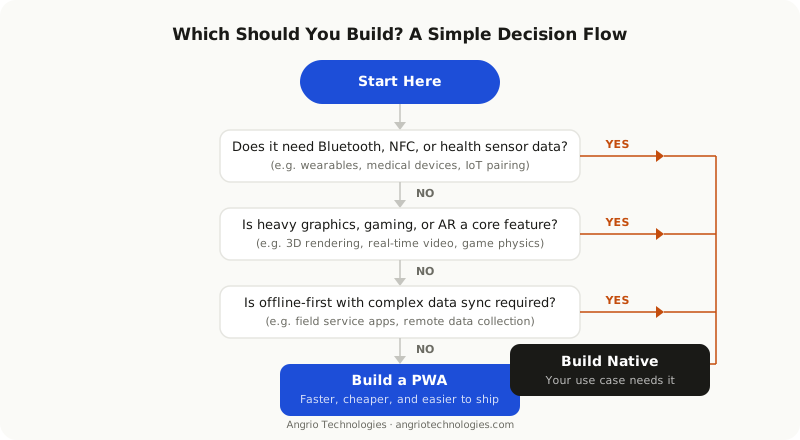
Three questions will get most teams to the right answer.
First: Does your app need features that browsers cannot reliably provide? Think Bluetooth pairing, health data access, complex background tasks, or augmented reality. If the answer is yes, go native.
Second: Will users find your product through search engines or existing web traffic? If yes, a PWA keeps that traffic and removes the friction of requiring an app store install before users can try your product.
Third: What is your realistic budget and timeline? If you have three to six months and a moderate budget, start with a PWA. Validate the product with real users, then invest in a native app when your data proves the use case justifies it.
The most common mistake we see is businesses building native apps because it "feels more professional." A well-designed PWA is just as polished and capable for most use cases. The real question is whether the technology actually meets your feature requirements.
Starting as a PWA and expanding to native later is a smart and common path. Rebuilding a poorly scoped native app from scratch is not.
What About Hybrid Apps?
Hybrid frameworks like Ionic and Capacitor let you write web code and package it as a native app. This gives you app store distribution and some native API access while keeping a web-based development workflow. It is a middle ground worth considering if you need app store presence but cannot justify a full native build. The trade-off is a slightly more complex setup and occasional gaps in native API support.
Start With the Right Foundation
The right choice depends on your users, your features, and your resources. Most businesses benefit more from a fast, well-built PWA than a slow-to-ship native app. Others genuinely need native capabilities from the start.
If you are unsure which path fits your product, the best move is to talk through your specific requirements with a team that has built both. The answer usually becomes clear quickly once you map your must-have features against what each approach can deliver.