A one-second delay in page load time cuts conversions by 7%. That sounds small until you do the math. If your website generates $50,000 a month in revenue, a two-second slowdown costs you roughly $84,000 a year. And that does not count the customers who never come back after a bad first experience.
Speed is not just a technical metric. It is a business metric. In 2025, Google also treats it as a ranking signal, which means slow sites get less organic traffic on top of everything else.
The good news: most websites have the same handful of performance problems, and fixing them does not require a full rebuild. You can make dramatic improvements by tackling the right issues in the right order.
What Are Core Web Vitals?
Google uses three specific measurements to evaluate your site's user experience. These are called Core Web Vitals, and they directly influence where your site appears in search results.
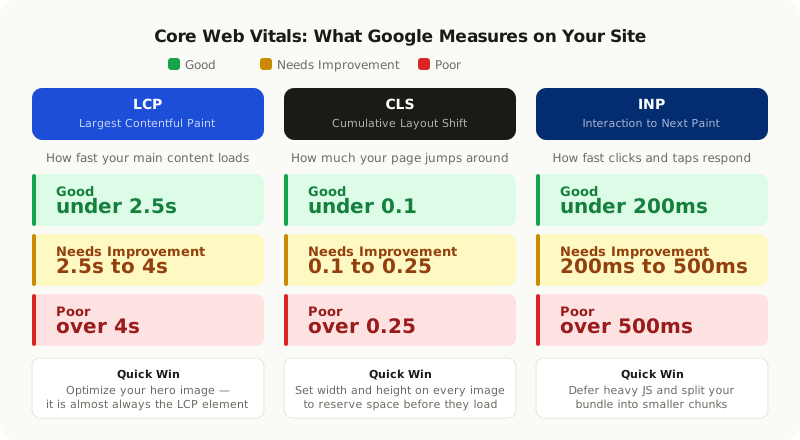
**LCP (Largest Contentful Paint)** measures how long it takes for the biggest visible piece of content to load. On most sites this is the hero image or a large heading. Google wants this under 2.5 seconds. If it takes longer, users perceive the page as slow before they have read a single word.
**CLS (Cumulative Layout Shift)** measures how much the page jumps around while loading. When a block of text shifts down because an image above it finished loading, that is layout instability. It is jarring and signals poor quality to both users and Google. The target score is under 0.1.
**INP (Interaction to Next Paint)** replaced the older FID metric in 2024. It measures how fast your site responds when someone clicks a button or taps a link. Google wants this under 200 milliseconds. A sluggish response makes the whole site feel unfinished.
Failing even one of these three pushes your site into the "Needs Improvement" or "Poor" category, which affects both user satisfaction and search rankings.
What Is Actually Slowing Your Site Down?
Most performance problems trace back to a small number of causes. You do not need to fix everything at once. Identifying your biggest bottleneck first and fixing it delivers the most improvement for the least effort.
| Performance Killer | Impact | Difficulty to Fix |
|---|---|---|
| Oversized or unoptimized images | Very High | Low |
| Too much JavaScript loading at startup | High | Medium |
| No caching strategy | High | Low |
| Slow server response time (TTFB above 600ms) | High | Medium |
| Render-blocking CSS or JavaScript in the head | Medium | Low |
| Too many third-party scripts | Medium | Low |
| No CDN for static files | Medium | Low |
| Large, unused CSS files | Low | Medium |
Images are almost always the first place to look. A single uncompressed hero image can weigh 3 to 5 MB, which means your page starts at a massive disadvantage before a single line of JavaScript runs.
Fix Images First: The Highest-ROI Change You Can Make
Images make up roughly 50 to 70 percent of total page weight on most sites. Fixing them correctly can cut your page size in half with relatively little effort.
**Use modern formats.** WebP images are about 25 to 35 percent smaller than JPEG at the same visual quality. AVIF goes even further at 30 to 50 percent smaller than WebP. Both formats are supported in all modern browsers. If your site is still serving PNGs and JPEGs everywhere, switching to WebP is your single biggest quick win.
**Resize images to their display size.** Serving a 2400px wide image inside a 600px container wastes bandwidth on every single page load. Generate multiple sizes and use the `srcset` attribute so the browser downloads only what it actually needs.
**Lazy load images below the fold.** Images the user has not scrolled to yet do not need to load immediately. The HTML `loading="lazy"` attribute handles this natively in all modern browsers without any JavaScript required. Add it to every image that is not in the first visible screen.
**Set explicit width and height on every image.** When a browser does not know an image's dimensions before it loads, it cannot reserve space for it. The image pops in and shifts everything below it, which directly hurts your CLS score. Always declare width and height in your HTML or CSS.
Switching from PNG to WebP and adding lazy loading alone cut the average page weight on one of our client's ecommerce sites from 4.2 MB down to 1.1 MB. Their Google Lighthouse score jumped from 38 to 79 in a single afternoon of work.
JavaScript: Ship Only What the Current Page Needs
JavaScript is the most expensive type of resource a browser processes. It must be downloaded, parsed, compiled, and executed before it does anything useful. Most websites load far more JavaScript than any single page actually needs.
**Code splitting** breaks your JavaScript bundle into smaller pieces and loads only the code needed for the current page. In React, the `lazy()` function and `Suspense` boundary let you load page components only when a user navigates to them, instead of loading every page upfront when the site first opens.
**Tree shaking** removes imported code that is never actually called. Make sure your build tool is configured to tree-shake, and avoid importing entire libraries when you only need one function from them. Importing `{ format }` from a date library is very different from importing the whole library.
**Defer third-party scripts.** Analytics, live chat widgets, and advertising scripts are common performance killers. Load them with the `defer` or `async` attribute so they do not block the initial page render. Better yet, initialize them after the main page content has finished loading.
**Audit your dependencies regularly.** Tools like Bundlephobia show you how much each npm package adds to your bundle size. Sometimes a 200 KB dependency can be replaced with 10 lines of native browser code.
CSS: Do Not Let Stylesheets Block the Page
By default, a browser cannot display anything until it has downloaded and processed all CSS files linked in the `<head>`. This makes CSS a render-blocking resource, meaning your page appears completely blank until styling is ready.
**Separate critical CSS from the rest.** The CSS needed to render what users see first (called "above the fold" content) should be inlined directly into the HTML. Everything else can load asynchronously. This technique alone can significantly reduce your LCP time because the browser can paint the first screen without waiting for a separate CSS download.
**Remove unused CSS.** Tools like PurgeCSS analyze your HTML and JavaScript and delete CSS rules that are never referenced. On projects using utility-first frameworks like Tailwind CSS, this can shrink your stylesheet by 90 percent or more.
**Minify your output.** Remove whitespace, comments, and redundant declarations. Modern build tools like Vite and webpack do this automatically in production mode, but it is worth confirming that your pipeline has it turned on.
Caching and CDN: Make Repeat Visits Nearly Free
A cache stores a copy of a file so it does not have to be fetched from the server again. A CDN (Content Delivery Network) places copies of your files in data centers around the world, so users receive them from a server close to them rather than your origin server.
**Browser caching** tells a visitor's browser to keep a copy of your CSS, JavaScript, and images for a set amount of time. For files that rarely change, you can set this to 30 days or longer. The next time a returning visitor loads your site, those files are already sitting on their device.
**Use cache-busting on every content change.** When you update a cached file, the browser will not notice unless the file's URL changes. Build tools handle this automatically by adding a hash to filenames (for example, `main.a3f9c2.js`). Never deploy static assets without some form of filename hashing.
**Put a CDN in front of your site.** Even if your server is in one location, a CDN like Cloudflare, Fastly, or AWS CloudFront can serve your static files from hundreds of locations worldwide. A visitor in Mumbai should not need to wait for a response from a server in Virginia.
Server Response Time: Start Fast, Stay Fast
The time between a browser making a request and receiving the first byte of a response is called TTFB (Time to First Byte). For a good LCP score, this should be under 600ms.
**Choose the right hosting tier.** Shared hosting places your site on a server alongside hundreds of other sites all competing for the same CPU and memory. For any web application under real traffic, a VPS or cloud provider gives you predictable and dedicated performance.
**Optimize your database queries.** Slow database queries are a frequent cause of high TTFB. Index the columns you filter and sort on, avoid patterns where a single request triggers dozens of separate queries, and consider caching frequently-requested results that do not change often.
**Use static generation or server-side rendering where it fits.** Pre-built HTML pages served from a CDN have essentially zero server processing time. For content that does not change per-user, such as a blog post or a marketing page, this is the fastest option available.
**Enable HTTP/2 or HTTP/3.** HTTP/2 lets the server send multiple files at the same time over a single connection instead of queuing them. HTTP/3 goes further, using a protocol that reduces latency especially on mobile networks. Most modern hosting environments support at least HTTP/2 by default.
Tools to Measure Your Site's Performance
You cannot improve what you cannot measure. These are the tools professionals use to find and diagnose performance problems.
**Google PageSpeed Insights** analyzes any public URL and gives you a score for both mobile and desktop, along with specific, prioritized recommendations. It combines lab testing with real-world data collected from Chrome users, so the results reflect actual visitor experience.
**Lighthouse** is built directly into Chrome DevTools and runs a detailed performance audit in your browser. Unlike PageSpeed Insights, it can test pages that require login or that are running locally on your development machine.
**WebPageTest** provides detailed waterfall charts that show exactly how each resource on your page loads, in what order, and how long each step takes. It is the best tool for diagnosing specific bottlenecks when you already know something is slow but cannot pinpoint what.
**Chrome DevTools Network tab** is the most hands-on option for debugging individual requests, checking whether cache headers are correct, and identifying which specific resources take the longest.
Your Complete Optimization Checklist
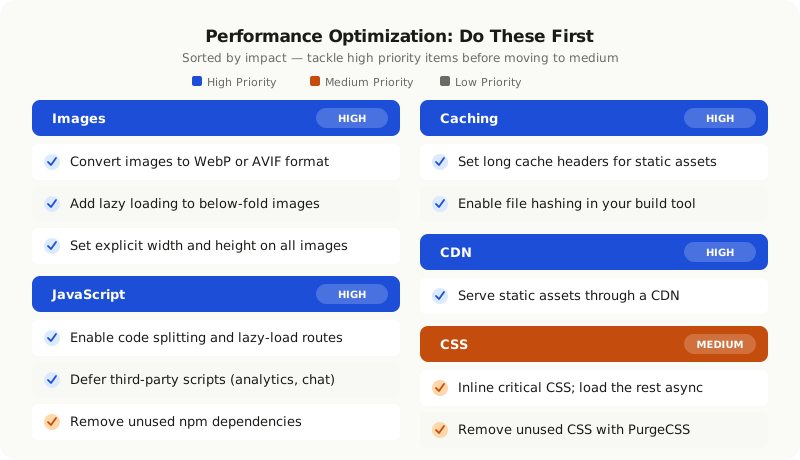
| Category | Action | Priority |
|---|---|---|
| Images | Convert to WebP or AVIF format | High |
| Images | Add lazy loading to below-fold images | High |
| Images | Set explicit width and height on all images | High |
| Images | Resize to display dimensions using srcset | High |
| JavaScript | Enable code splitting with lazy-loaded routes | High |
| JavaScript | Defer third-party scripts | High |
| JavaScript | Remove unused npm dependencies | Medium |
| CSS | Inline critical CSS in the HTML head | Medium |
| CSS | Remove unused CSS with PurgeCSS | Medium |
| Caching | Set long cache headers for static assets | High |
| Caching | Enable filename hashing in your build | High |
| CDN | Serve static files through a CDN | High |
| Server | Move to cloud or VPS hosting | Medium |
| Server | Index and optimize slow database queries | Medium |
| Server | Enable HTTP/2 or HTTP/3 | Low |
Performance is not a one-time fix. New features add weight over time, and small regressions stack up. Running a quick Lighthouse audit every quarter keeps you ahead of problems before they start affecting users or rankings.
Where to Start If You Are Overwhelmed
If your site scores below 50 on PageSpeed Insights, images and JavaScript are almost certainly the problem. Fix those two things first. That combination alone typically doubles or triples a score on most real-world sites.
If you are already scoring 70 or above and want to push further, focus on critical CSS inlining, server response time, and CDN configuration. Those optimizations have smaller individual gains but compound well.
The sites that rank well, convert consistently, and build loyal audiences are almost always the fast ones. For any business that depends on web traffic, performance is one of the highest-leverage investments you can make, and it does not require starting over from scratch.