Open your cloud bill at the end of the month and you might feel a small jolt. It is bigger than last month. Again.
Most companies running on AWS, Azure, or Google Cloud know this feeling well. The bill grows quietly, month after month, even when traffic stays flat. Nobody on the team can tell you exactly why. The finance team starts asking questions. Engineering shrugs. Somewhere along the way, the conversation gets pushed to next quarter, and the bill keeps creeping up.
This post explains the real reasons behind a rising cloud bill, the five most common sources of waste, and a simple four step framework you can use to bring spending back under control. The goal is to give business leaders enough understanding to ask the right questions and make sensible decisions, without needing to learn how the cloud actually works under the hood.
Why Your Cloud Bill Keeps Growing
Cloud spending is different from any other technology cost you have ever paid. Unlike servers you used to buy and depreciate over five years, cloud resources are billed by the hour, by the gigabyte, by the request, and sometimes by the millisecond.
That billing model is powerful when you use it well. It is also dangerous when you do not. There is no upper limit, no purchase order, no procurement check. Anyone with the right access can create resources that cost real money in seconds.
Three patterns drive most of the silent growth.
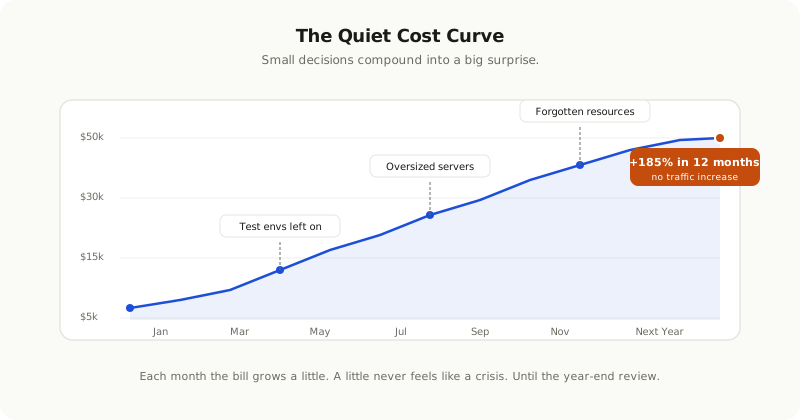
**Forgotten resources.** A developer spins up a test database to try something out. The experiment ends. The database stays. Three months later, no one remembers why it exists, but it is still on the bill every single day.
**Overprovisioned services.** A team picks server sizes during planning and adds a safety margin, then another, just to be safe. The application launches and never uses more than 30 percent of the capacity. The other 70 percent gets paid for every month, forever.
**Auto scaling without limits.** Modern services scale up automatically when demand spikes. If nobody sets a ceiling, a small bug in the code or a sudden burst of bot traffic can send your costs soaring overnight, before anyone notices the alert.
These patterns compound over time. By the time someone takes a serious look, the monthly bill is often 30 to 60 percent higher than it needs to be.
The dangerous thing about cloud cost growth is not that it is sudden. It is that it is gradual. Each month it goes up by a little, and a little never feels like a crisis worth fixing now.
The 5 Most Common Sources of Cloud Waste
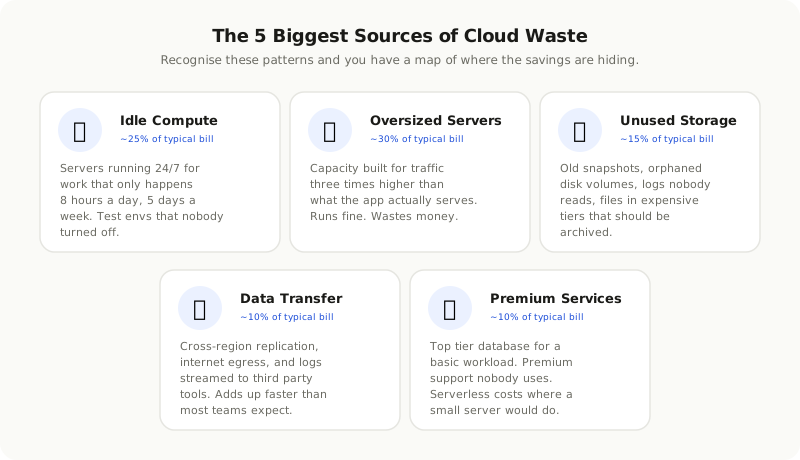
Across teams of every size, the same waste patterns repeat. If you can recognise these five, you have a starting map of where the savings are hiding.
Idle Compute
Servers running 24 hours a day for workloads that only need to be available during business hours. Test environments left on overnight and through every weekend. Old projects that nobody turned off after launch. Internal dashboards used by three people once a week, running on production class infrastructure all the time.
If a resource only does useful work for 8 hours a day on weekdays, you are paying for the other 128 hours of the week for no benefit. That is roughly four times more than the work it actually does.
Oversized Servers and Databases
Production databases on instance sizes meant for traffic three times higher than they actually serve. Application servers built for traffic peaks that happen twice a year, but running at full capacity every other day too. Caches sized for an old workload that has long since changed shape.
The cloud provider does not warn you when you are oversized. The service runs fine. The numbers on the bill go up because of capacity nobody is using.
Unused Storage
Storage is one of the easiest places to waste money because it is invisible. Backup snapshots from years ago, kept "just in case." Disk volumes from servers that were deleted, but the disks were never released. Log files growing forever because nobody set a retention rule. Files sitting in expensive hot storage tiers that should have moved to cheap archive tiers months ago.
A typical cloud account, after a few years, has 20 to 40 percent of its storage spend on data nobody touches.
Expensive Data Transfer
Moving data between regions, between clouds, or out to the public internet costs more than most teams expect. Pulling a large analytics export every day. Replicating a database across regions for a disaster recovery plan that has never been tested. Sending logs to a third party platform that charges by the gigabyte on the way in.
The first time you see a transfer line bigger than your compute line, it is a shock. It does not have to stay that way.
Premium Services on Commodity Workloads
Using a managed database optimised for very high throughput when a basic instance would do the same job. Paying for the most expensive support tier when nobody on your team has filed a ticket in 18 months. Running an expensive serverless platform for jobs that would cost a fraction on a small dedicated server.
The premium tier is rarely a mistake. The mistake is using it for a workload that does not need it.
A 4 Step Framework to Take Control
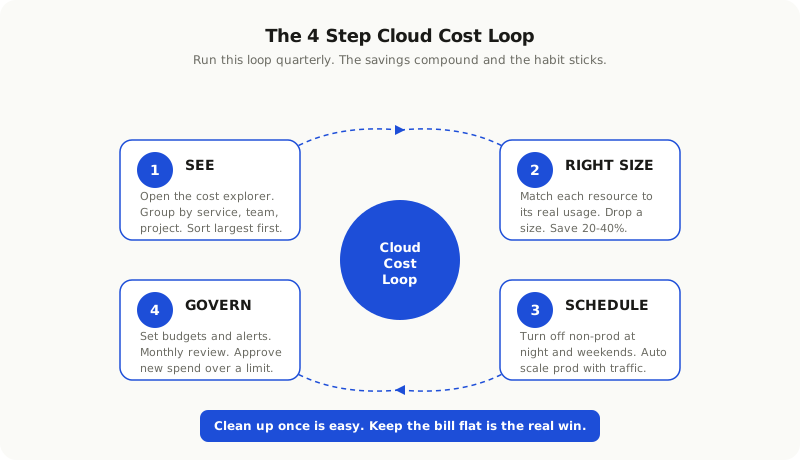
You do not need a finance team or a fancy dashboard to fix this. You need a clear sequence and the discipline to follow it.
Step 1: See What You Are Actually Paying For
Open the cost explorer in your cloud console. Every major provider has one and they are all free. Group spending by service, by team, and by project. Sort the result from biggest to smallest.
Most companies discover that 80 percent of the bill comes from 20 percent of the resources. That is where you focus first. Reducing a tiny line item by half saves almost nothing. Reducing a giant line item by 20 percent changes the whole picture.
If you cannot tell which team owns which resource, that is a problem on its own. Tagging every resource with an owner, a project name, and an environment label is one of the most valuable things you can do early. Without tags, every cost discussion turns into "I do not know who created that, can you ask around?"
Step 2: Right Size Whatever Is Already Running
For every major resource, ask one question. Is this size correct for what it actually does?
Pull up the usage data over the last 30 to 90 days. If a server has been running below 25 percent on CPU and memory the whole time, it is too big. Drop it down a size. Most teams find they can cut compute spend 20 to 40 percent without any change to performance.
Do the same for databases, for storage tiers, and for anything else with a size or class choice. The cloud providers all have built in recommendations for this. The recommendations are not perfect, but they are a fine starting point.
Step 3: Schedule and Stop What Does Not Need to Run
Test environments and internal tools rarely need to run on weekends. Many can be shut off overnight too. A simple schedule that turns them off from 8 PM to 8 AM, plus all weekend, removes nearly two thirds of their runtime, and therefore most of their cost.
For production systems with predictable traffic patterns, modern auto scaling can scale down during quiet hours and back up before the morning rush. The savings are real and the user impact is zero, as long as the rules are correct and you test them.
For batch jobs, ask whether they need their own dedicated infrastructure or whether they can share with something else. Idle batch infrastructure waiting for the next nightly run is one of the most common waste patterns.
Step 4: Govern New Spend Going Forward
Cleaning up once is easy. Keeping the bill flat is the harder problem.
Set spending limits on every major service. Cloud providers will alert you, or even block creation, when a budget is about to be exceeded. Configure these alerts to go to people who can actually act on them, not to a shared inbox nobody reads.
Review the bill once a month with whoever owns the relevant systems. Five focused minutes per area is enough to catch new resources before they become permanent. Make this a calendar event, not a hope.
If the team grows, set one simple rule. Anything that costs more than a defined amount per month must be reviewed before launch. The number does not matter as long as it is clear. The point is to stop accidental spending before it happens, not to apologise for it later.
What Savings Should You Realistically Expect?
Cloud cost work follows a predictable curve. The first review almost always finds easy wins. The second review finds smaller wins that take more effort. The third and beyond require deeper architectural changes.
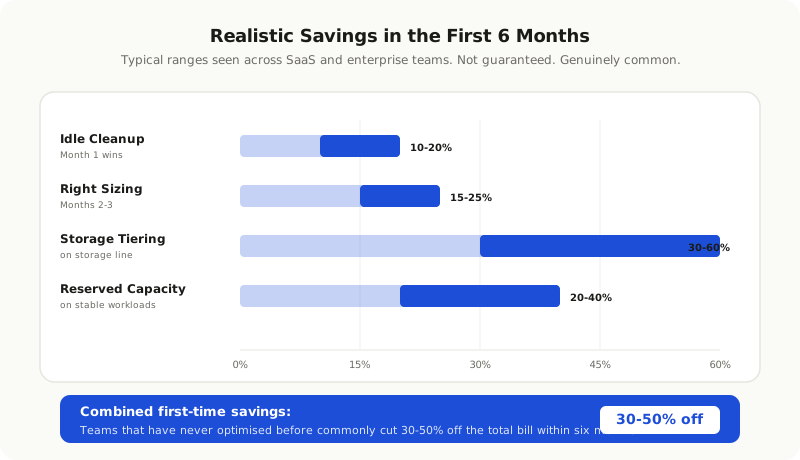
In our work with teams across SaaS, ecommerce, and enterprise applications, the typical savings break down like this.
Idle resource cleanup gives you 10 to 20 percent off the bill in the first month. Right sizing servers and databases removes another 15 to 25 percent over the next two to three months. Storage tiering and lifecycle rules cut storage spend by 30 to 60 percent on the storage portion. Reserved capacity or committed use discounts, once your usage is stable, save another 20 to 40 percent on the workloads you commit to.
Combined, total savings of 30 to 50 percent in the first six months are common for teams that have never done this work before. The exact figure depends on how much waste was hiding in the first place.
These numbers are not guaranteed. They are realistic ranges based on patterns we see again and again. If your team has already done several rounds of optimisation, the easy wins are gone and the next round will be harder.
When to Do This Yourself and When to Get Help
A small team with a focused product can run through the first round on their own, especially if a senior engineer has time to lead it. The cloud providers all offer free cost analysis tools that will get you most of the way there.
Bringing in outside help makes more sense in a few cases. When the bill is large enough that even a small percentage saving is meaningful in real money. When the architecture is complex and spans multiple clouds or many services. When nobody on the team has the time or the recent experience to lead the work without dropping product priorities. When the team has already done the easy passes and wants to find the deeper savings that require detailed knowledge of the cloud provider, the architecture, or both.
Either way, the work is worth doing. A cloud bill that grows unchecked is not just a finance problem. It is a signal that nobody is watching how the platform is being used, which often hints at deeper issues in architecture, ownership, and engineering process. Fixing the bill usually fixes some of those too.
A Quick Note on Reserved Capacity and Discounts
You will eventually run into the topic of reserved instances, savings plans, or committed use discounts. The idea is the same on every cloud. You promise to use a certain amount for one or three years, and the provider gives you a meaningful discount on that usage.
These deals are excellent on stable, predictable workloads. They are a trap on workloads that are still changing. Do not commit to three years of capacity for a service that might be rebuilt next quarter, or for a product that has not yet found its growth pattern.
A safe rule. Only commit to long term discounts on infrastructure that has been stable for at least six months and is expected to keep running for at least the length of the commitment.
Start With One Hour and the Cost Explorer
The hardest part of cloud cost work is starting. Once you start, the patterns become visible quickly and the wins follow.
Block one hour on your calendar. Open your cost explorer. Sort by service from largest to smallest. Pick the top three line items and ask, for each one, "could this be smaller, off, or different and still do the job?"
You will almost certainly find an answer for at least one of them. That is your first saving. Tell the team. Set a follow up review for next month. Repeat.
Cloud spending is not a problem you solve once. It is a habit you build. Companies that treat cost as part of engineering culture, the same way they treat security and quality, end up with bills that match the value they deliver, instead of bills that quietly match their carelessness.
The goal is not to spend the least possible amount on cloud. The goal is to spend confidently. Every line on the bill should be there because someone decided it should be, not because nobody noticed it.