A founder I met for coffee last week said something that stopped me mid sip. He told me he has not opened a single dashboard in his own product for two months. Not the revenue chart he used to refresh four times a day. Not the funnel he was famous for staring at on Sunday nights. Not the cohort grid that took his team a quarter to build.
Instead, he types a question into a small box at the top of his app. How did pricing changes affect retention last month. Which customers slowed down their usage after the April release. Show me the ten accounts most likely to churn this quarter and tell me why. The product answers in two short paragraphs and a small chart, only when a chart actually helps. He has gone from dashboard watcher to question asker, and he says he will never go back.
He is not alone. Across the products I have looked at this year, the pattern is the same. The big dashboard page is still there, but the eyeballs have moved. The ask anything box at the top is doing the work the dashboards were supposed to do, and doing it faster. By the end of 2026, I think most serious software products will have shifted their center of gravity from charts to conversations. This post is about why that is happening, what is actually replacing the dashboard, and how to add a conversational layer to your product without throwing away the trust your charts used to carry.
The Dashboard Was Always a Compromise
The modern dashboard, with its tiles of numbers and a row of charts at the top, was not designed because it was the best way to understand a business. It was designed because it was the best way humans and software could meet in the middle, given what software could do at the time.
Software could not understand a question in plain language. So we built a fixed set of charts and asked the human to translate every question into a sequence of clicks and filters. Software could not summarise. So we packed twenty numbers into a single page and trusted the human to find the story. Software could not explain. So we added tooltips, footnotes, glossaries, and an analyst on Slack to answer the questions the chart had quietly created.
For twenty years, this worked because there was no better option. Every serious product shipped a dashboard. Every serious user learned to read one. The dashboard became a feature, then a competitive moat, then a job title. Whole companies were built around making them prettier, faster, and harder to leave.
The compromise was always visible if you looked. Users opened the dashboard with a question in their head and almost never left with the answer. They left with three new charts to email someone else about. The work of turning data into a decision still happened in a meeting, a doc, or a head. The dashboard was the warm up, not the workout.
What Is Actually Replacing It
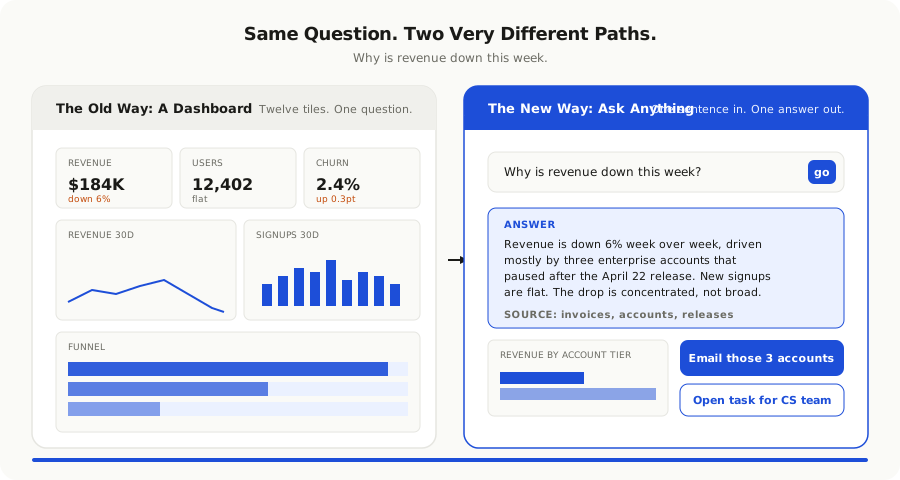
The replacement is not a chatbot bolted onto a chart. That was the 2024 experiment, and most of those features quietly disappeared. The thing that is winning is more thoughtful. It looks like a single input at the top of your product. It speaks the user's language. It answers with words first and pictures only when pictures help. It cites the rows it used. It remembers the last few questions you asked. It hands you back a link or a button when the answer is something you can act on inside the same product.
People have started calling this conversational analytics, or the ask anything layer, or simply the AI panel. The label does not matter. What matters is that it does three jobs the dashboard could not do well.
The first job is **answering the real question**. A user almost never wants to look at the funnel. They want to know if the funnel got worse this week and why. A good conversational layer reads that intent, runs the right query, and writes a sentence. Sometimes it includes a small chart underneath because a chart genuinely helps. Often it does not, because two numbers and a reason are all that was needed.
The second job is **explaining what changed**. The dashboard told you the number. The conversational layer tells you why. It can compare two time windows, point at the segment that moved, and link to the customer or product event that started the slide. It does in three sentences what an analyst used to do in three days.
The third job is **closing the loop**. When the answer is "thirty customers stopped logging in last week," the next step is not another chart. It is a button that drafts an email to those customers, opens a Slack thread with the customer success owner, or creates a task. The conversational layer lives inside the product, so it can do the next step without asking the user to copy a list into another tool.
That is the heart of the shift. The dashboard was a place you went to look. The conversational layer is a place you go to decide.
Why It Works Now When It Did Not Before
People have been trying to talk to their data for thirty years. Natural language interfaces for databases existed in the nineties. Every BI vendor has shipped some version of a search box. None of them changed how anyone worked. Three things finally lined up in 2026 that were not true before.
The first is that **models got smart enough to write the right query**. Earlier attempts mapped sentences to a small set of predefined reports. They broke as soon as a user asked something slightly different. A modern model, given a clean schema and a few well written examples, can write a correct query for almost any reasonable question. The hard part is no longer the language. It is the data underneath.
The second is that **the models can read the answer too**. The old natural language tools could fetch a number. They could not look at the result, notice that one segment was the obvious cause, and say so. A modern model can. That moves the experience from "here is your chart" to "here is what is happening and what I would do next."
The third is that **the cost finally fits**. A serious dashboard query today might cost a hundredth of a cent in tokens. Even with retrieval, summary, and follow up clarification, a full conversation is comfortably inside the unit economics of a normal SaaS product. We wrote a whole separate piece on [why token costs are the new cloud costs](/blog/token-costs-are-the-new-cloud-costs-budgeting-ai-into-your-product), but the short version is that conversational analytics is finally affordable to ship at scale.
The dashboard answered the questions you could think of in advance. The conversational layer answers the question you had this morning.
Where Conversations Beat Charts, And Where They Do Not
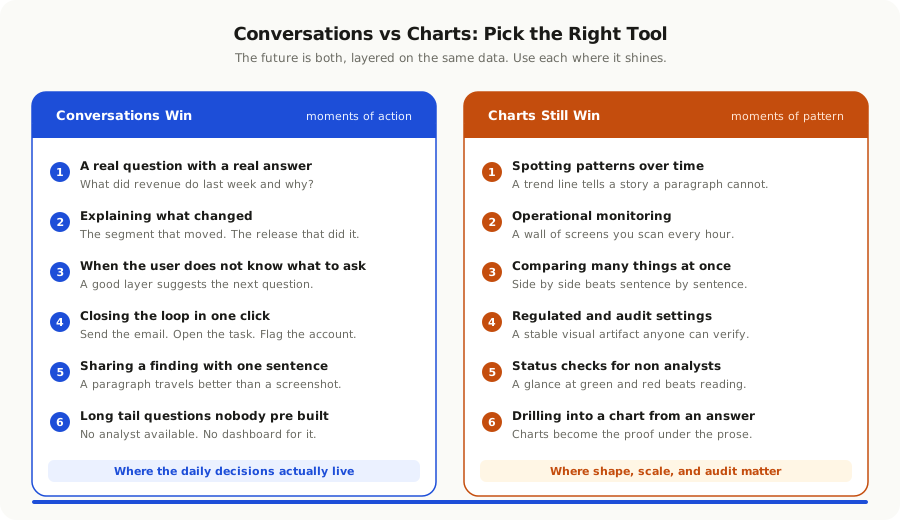
The honest answer is that conversations are not better than charts at everything. They are better at the moments that matter most for action, and charts still win for a few things conversations probably never will.
Conversations beat charts when the user has a real question with a real answer. What did revenue do last week and why. Which customers are at risk this month. What changed after we shipped on Tuesday. These are everyday questions, and the dashboard has been answering them badly for years. A short written answer with one supporting chart is faster, clearer, and easier to share.
Conversations also beat charts when the user does not know what to ask. A good conversational layer can suggest the next question. It can notice that retention dipped and offer to dig in. It can act like the analyst who used to sit two desks over and quietly point at the thing you missed. A dashboard cannot do that. It can only show you what someone built for you a year ago.
Charts still win in a few places. They win when the user is looking for patterns rather than answers. A long trend line really does tell a story that a paragraph cannot. They win in operational settings where the same numbers must be checked at the same time every day. A network operations center is not going to replace its wall of screens with a chat window. And they win in compliance and regulated contexts where the source of truth must be a stable visual artifact that anyone can audit.
The future is not charts or conversations. It is conversations on top of charts. The same product page can hold both. The user enters with a question and gets a written answer. If they want to look at the underlying chart, it is one click away. If they want to know how the answer was calculated, that is one click too. Trust travels in both directions.
How Teams Get This Wrong
The shift from dashboards to conversations sounds simple. It is not. The teams that ship a conversational layer and have it actually used keep falling into a few traps before they get it right.
**They treat it as a chatbot.** A box that takes typed input and produces typed output is not what users want. They want a tool that already knows what product they are in, what page they are on, what they were looking at five seconds ago, and what they tend to ask on Monday mornings. A generic chat experience feels like a bolt on. A contextual one feels like a power tool.
**They skip the citations.** A confident paragraph with no source is a rumour, not an analytic. Every answer needs to show the rows, the time window, and the assumptions it used. The moment a user catches the system bluffing, the trust is gone for months. Citations are the single most important feature in this whole category.
**They ignore the schema work.** A model can only write a good query against data it understands. Most teams have a database that was built for engineers, not for natural language. Column names like "u_ts_v2" and tables called "events_archive_final" will defeat any model. The week or two of work to give your tables clear names, write a glossary, and label the metrics that matter is what makes the difference between a magic feature and a frustrating one.
**They let the model invent metrics.** When a user asks for "active users," the system must use the metric the company actually uses, not whatever the model thinks "active" should mean. A small metrics layer that defines the handful of numbers that matter is non negotiable. Without it, every team in the company ends up with a slightly different version of the same answer, and trust collapses.
**They forget the action.** An answer that ends in another question is a missed opportunity. The user did not come to chat. They came to do something. The best conversational layers always offer the next step in the same panel. Send an email. Open a task. Flag the account. The conversation should end with a click, not a scroll.
**They keep all the dashboards anyway.** This is the most common mistake. Teams add a conversational layer on top of fifty old dashboards and watch the maintenance bill double. The honest move is to use the conversational layer to find out which dashboards still earn their keep, retire the rest, and free up the team to make the few that remain genuinely great.
A Pragmatic Way to Add a Conversational Layer
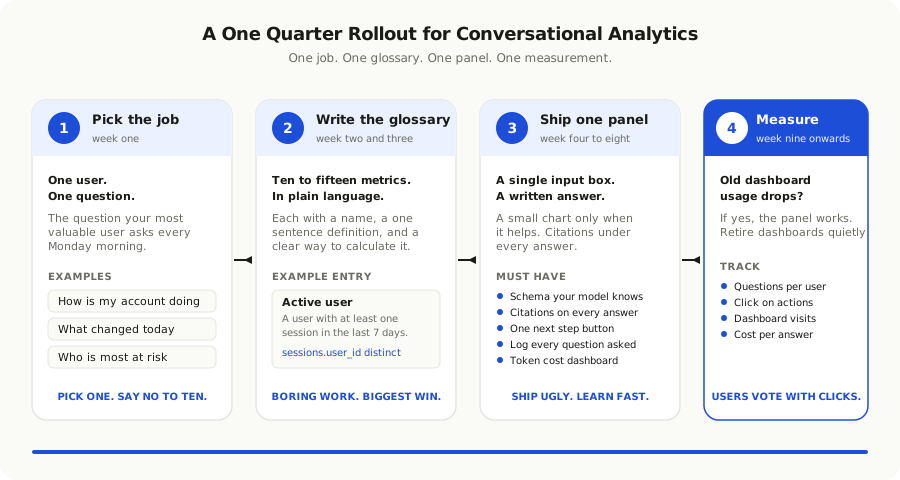
You do not need to throw out your existing analytics to start. You need a small focused experiment that proves the pattern works in your product before you scale it.
Start with one user and one job. Pick the question your highest value user asks most often. For most B2B SaaS products, this is some version of "how is my account doing this week." For most internal tools, it is "what changed today." Pick the job, not the page.
Define the metrics that matter. Write a short glossary, in plain language, of the ten or fifteen numbers your product actually cares about. Each metric should have a name, a one sentence definition, and a clear way to calculate it. This document is small, boring, and the most important piece of work in the whole project.
Build the smallest possible answer engine. A single input at the top of one page. A model in the middle that knows your glossary and your schema. A panel that shows the answer in plain language, the rows it used, and one small chart if helpful. No history. No memory. No follow up questions yet. Ship that and watch what users actually type.
Add follow ups once the basics work. Memory of the last few questions in the session. The ability to refine an answer. A small set of one click follow up prompts. Each of these adds real value only after the core answer is trusted.
Wire in the actions. Each answer should offer one or two relevant next steps. The action set is small at first. Email these users. Create a task. Open this account. The right actions become obvious once you see the questions users actually ask.
Measure the dashboard you replaced. After a month, look at the old dashboard's usage. If the conversational layer is doing its job, that dashboard's traffic will have dropped quietly. That is the signal to retire it, not a leadership decision. The user has already voted.
If you want a deeper picture of what it takes to operate this kind of feature responsibly, our piece on [why your data isn't ready for AI and what to fix first](/blog/why-your-data-isnt-ready-for-ai-and-what-to-fix-first) covers the data side in more detail. The conversational layer is only as good as the tables and definitions sitting underneath it.
The Bigger Pattern
Step back from analytics for a moment. The same shift is showing up everywhere in software. The dropdown menu is being replaced by an ask anything box. The settings page is being replaced by a small assistant that can change settings on your behalf. The help center is being replaced by an in product agent that can read the docs and answer your question without making you read them.
The pattern is the same in every case. For years, software gave us a structured interface because that was the only way it could be sure of what we wanted. Now that software can understand a sentence, the structured interface becomes the back end of a much simpler front end. The chart is still there. The settings are still there. The docs are still there. They just stop being the way a user has to interact with the product.
The companies that win the next five years are not going to be the ones with the most beautiful dashboards. They are going to be the ones that meet their user with a sentence, answer with a sentence, and quietly use every chart, query, and workflow underneath as machinery. The dashboard moves from the front of the product to the engine room.
This is the same arc we have seen in software again and again. The command line gave way to the graphical interface because most users were not engineers. The graphical interface is now giving way to the conversational interface because most questions are not buttons. The product looks simpler from the outside. Underneath, it has more work to do, and that is where the real engineering goes.
If you are running a product team in 2026 and your roadmap still talks about new dashboards, it is worth pausing to ask whether you are building the warm up or the workout. The dashboard served us well for twenty years. It is okay to thank it and put it in the engine room where it belongs.