Last month, a SaaS founder I work with noticed something odd in his analytics. About one in three new accounts on his project management tool had been created by an AI agent on behalf of a user. Not a bot. Not a scraper. A real person had asked Claude or ChatGPT to set them up an account on the tool and start a project for their team, and the model had done it. Logged in. Filled the forms. Invited the team. Picked the wrong plan.
He had not designed any of that. The tool worked, sort of. The agent got through the signup, but it tripped on a dropdown that needed a hover, missed a checkbox that had no label, and chose the most expensive plan because that was the first option in the list. The user emailed support. Support apologized and downgraded the plan. The team marked the ticket as closed. Nobody asked the bigger question.
The bigger question is this. Your product now has two kinds of users. The human one you have been designing for since day one. And the AI agent that opens your app on the human's behalf, fills in the forms, clicks the buttons, and sends the messages. By the end of 2026, most software built for businesses will be used by both at the same time. The teams that figure out how to design for the second user are going to look like they invented something new. They did not. They just stopped pretending the second user was not there.
Every Product Now Has Two Users
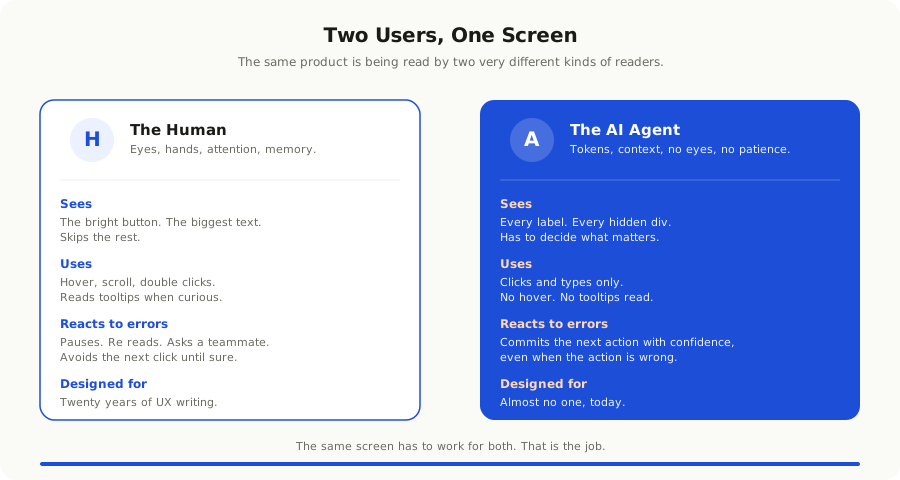
For most of the history of software, a product had one user. A person. That person had eyes, hands, attention, patience, and a memory of the last thing they did in your app. Every choice you made about UX was tuned to that person. Buttons were big enough to click. Errors were friendly enough to read. Workflows had as few steps as you could get away with.
Then in 2025 something quietly shifted. ChatGPT got a browser. Claude got computer use. Both rolled out proper agent modes that could log in to apps and finish tasks on their own. By the start of 2026, MCP servers were everywhere and almost every serious tool had one. The result is that when a user asks an AI to book a flight to Mumbai for Tuesday and put it on the calendar, a real software session opens, navigates pages you built, and tries to use them.
Most software was not ready. Forms broke. Buttons were unreachable. Errors were images of text. The agent guessed and got it wrong, and the human got an unexpected charge or a wrong booking or a confused inbox. Some teams responded with anger and tried to block agents. A few teams responded with curiosity and asked what their product would look like if it actually welcomed them.
This post is about that second response. It is the more interesting one, and it is the one that matters for revenue.
What an AI User Actually Does Differently
You cannot design for the second user without understanding how the second user works. An AI agent is not a slow human. It has a different shape.
An agent reads the page. The whole page. Every label, every button, every aria attribute, every hidden div. A human glances at a screen and finds the part that matters in two seconds. An agent reads everything and then has to decide what matters.
An agent does not hover. It cannot tell you when it is confused. If your dropdown opens on hover, the agent will miss it. If your tooltip carries information that changes the meaning of a button, the agent will not see it. Hover is a human convenience. The agent treats it as if it does not exist.
An agent has no eye for visual hierarchy. A button that is bright and big does not draw an agent's attention. If two buttons share the same label, the agent will pick the wrong one as often as the right one. Visual emphasis means nothing without semantic emphasis.
An agent works in short bursts. A model has a context window. Inside that window it has to remember the user's goal, the page it is on, the last action it took, and the next action to try. If your page makes the agent re-read a five thousand word footer on every step, it will run out of room and start making mistakes.
An agent can be wrong with confidence. A human who is unsure will pause, scroll, and ask a friend. An agent who is unsure will commit an action and move on. That single difference is the most important one. It changes everything you should care about in your product.
Once you internalize this, the design problem becomes clear. You are not designing for a slower or dumber human. You are designing for a second kind of reader who needs different cues to make the right decision.
The Five Things an AI Agent Needs From Your Product
After helping a few teams retrofit their apps for agent use, the same five needs keep showing up. None of them require a redesign. All of them require attention.
**Predictable URLs and routes.** An agent learns your product by reading URLs and navigating between them. If your invoice page is at `/invoices/new` today and `/billing/create` tomorrow, the agent has to relearn the map every visit. If the same action lives at three different routes in three different flows, the agent will pick the wrong one. Stable, descriptive URLs are the agent's version of a sitemap.
**Honest HTML and clear labels.** A button labeled Submit tells a human nothing and tells an agent even less. A button labeled Submit purchase order for 12 units tells both exactly what is about to happen. Forms with proper labels, inputs with proper types, regions with proper landmarks, and links that say where they go. None of this is exotic. It is good HTML, which most apps stopped writing about ten years ago. Agents are bringing the bill due.
**Machine readable status messages.** When something fails, do not show a red banner with a smiley face. Tell the agent what failed and what to try. The message Could not save changes because the project name is already in use is useful. The message Oops, something went wrong is not. Status codes, structured error responses, and clear text errors are the bare minimum.
**Idempotent actions and an obvious undo.** Agents will retry. They will hit the same endpoint twice if your page is slow. They will fill the same form again if the success page does not load. If your create order action runs twice, you ship two orders. Idempotency keys, confirmation pages, and a clear undo path keep small mistakes from turning into expensive ones.
**Permission patterns the agent can read.** Agents are good at following rules and bad at guessing them. If a user role cannot perform an action, do not silently disable a button with no message. Tell the agent that the action is not allowed for this role. Otherwise the agent will keep clicking, keep failing, and keep retrying, and your support inbox will fill up with confusing tickets.
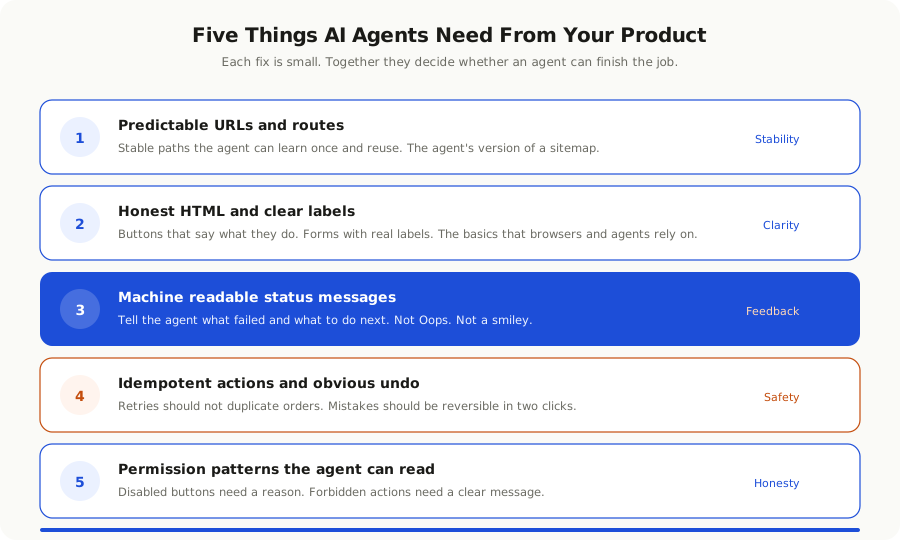
These five fixes are not glamorous. They will not show up in a launch announcement. They will, quietly, make your product the one that an agent recommends to its user when the user asks for a tool to do the job.
The Hidden Cost of Designing for Humans Only
Most teams are still designing as if the second user does not exist. The cost is harder to see than a server bill, but it is real.
The first cost shows up in support. Tickets that used to come from confused users now come from confused users whose agents made a mess. The agent picked the wrong plan, sent the wrong invite, applied the wrong filter. Your support team cannot tell that an agent was involved. They treat each ticket as a one off. The volume creeps up.
The second cost shows up in conversion. When a user asks a model to set them up on a tool and the model fails halfway through, the user does not always come back. The user goes to a different tool that worked the first time. You never see them. Your funnel does not show them as a lost user, because they never finished the signup.
The third cost shows up in trust. The first time an agent makes a costly mistake on your platform, the user blames you, not the agent. They tell their friends. They write a review. They mention it in the next product comparison. Your reputation takes a hit you did not earn but cannot avoid.
The fourth cost is the slowest and the largest. The next generation of integrations, recommendations, and discovery is happening through agents. When an agent decides which tool to suggest for a job, it picks the one it has had the best experience with. If your product is hard for agents to use, your product slowly drops off the list of tools that get suggested. You do not lose users in a single quarter. You lose them in a steady drip, and you cannot trace why.
None of this is hypothetical anymore. Tools that respond well to agents are seeing real growth from a channel they did not plan for. Tools that ignore the trend are not yet hurting visibly. They will.
The first user complains. The second user just leaves. You will not see it on a dashboard until it is too late.
APIs Are Not Enough Anymore
The first reaction many teams have to all of this is to ship an MCP server, point the agent at it, and call the problem solved. This is a good start and a bad finish.
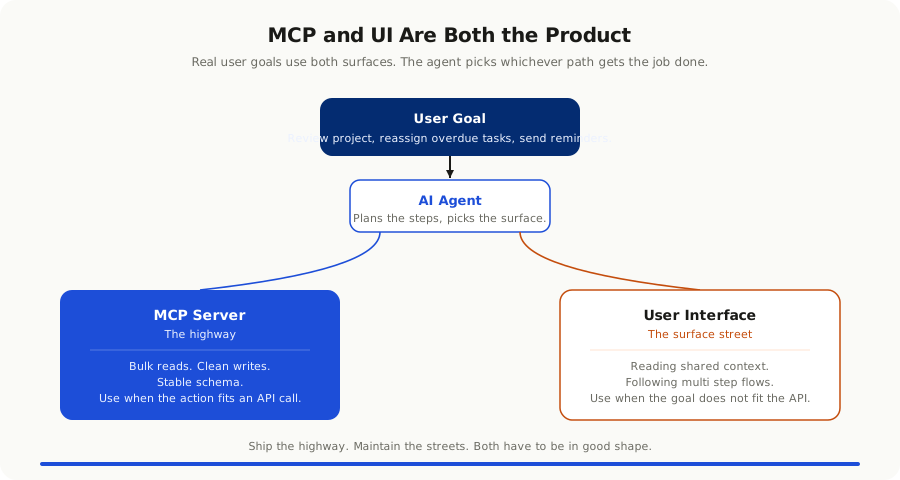
An MCP server lets an agent perform actions through a clean interface. That is excellent for tasks that map cleanly to single API calls. Create a record. Update a field. Send a message. For these tasks, an agent should never be asked to use your UI. Use the API.
The trouble is that real user goals rarely map to single API calls. A user asks the agent to review the project, find the overdue tasks, reassign them to people who are free this week, and send a polite reminder. That is six API calls, three queries, and two judgment calls. The agent will end up using your UI for at least part of the work, especially when it has to read context that the API does not expose.
So you ship the MCP server, and you also fix the UI. The two are not alternatives. They serve different parts of the same flow. The MCP server is the highway. The UI is the surface street the agent uses when the highway does not get there. Both have to be in good shape.
The teams that got this right early treat their MCP server as a public API and their UI as a fallback API that an agent might use at any time. Both are designed. Both are tested. Both have an agent run through them once a week to catch regressions.
Where Teams Are Getting This Right
A few patterns are starting to repeat across teams that have done this well.
**They write a tour for agents.** A short page, sometimes called an agent guide or a manifest, that tells an agent what the product does, what the main objects are, and how to do the most common tasks. Some teams put it at a known URL like `/.well-known/agent-guide.md`. Some put it at the root of their MCP server. The format is less important than the existence of one.
**They label their forms like adults.** Every input has a label. Every button says what it does. Every error tells you what went wrong and what to do next. The team that spends two days on this often sees agent task completion jump from forty percent to eighty without changing anything else.
**They build an agent test into CI.** A small suite that opens the product as an agent would, tries to complete the top five tasks, and fails the build if any of them break. Most teams use Playwright with an agent in the loop. The cost is low. The signal is excellent.
**They expose pricing and limits clearly.** When an agent has to pick a plan, it should not have to guess. Plans, prices, and limits live on a page that an agent can read without a marketing animation getting in the way. The user gets the right plan the first time. The downgrade ticket never gets filed.
**They send agent aware confirmation emails.** When an agent performs a meaningful action, the email confirmation includes a clear plain text summary at the top. The user reads it on their phone. The agent reads it in the user's inbox if asked to follow up. Both flows work. Neither is starved for context.
**They make undo cheap.** A bad agent action that can be undone in two clicks costs nothing. A bad agent action that requires an email to support costs trust. The teams winning here treat undo and history as core features, not advanced ones.
None of these are dramatic redesigns. They are small choices, made consistently, that turn a product into one agents can use safely.
Where Teams Get This Wrong
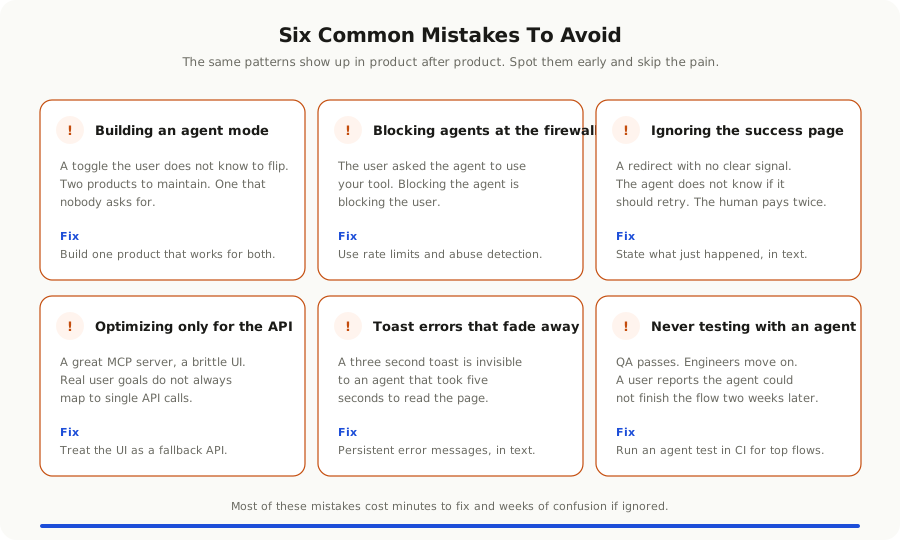
The mistakes are as repeatable as the wins.
**They build an agent mode.** A toggle that switches the UI into a stripped down agent friendly version. This sounds clever and almost always fails. The user is not the one driving. The agent does not know to flip the toggle. Your real users get a worse experience because they are paying for the special mode they do not need. Build one product that works for both.
**They block agents at the firewall.** This is increasingly common and almost always the wrong move. The user asked their agent to use your tool. Blocking the agent is blocking the user. The right answer is rate limits and abuse detection, not a blanket ban on user driven agent traffic.
**They optimize only for the API.** They publish a beautiful MCP server, ignore the UI, and assume agents will use the API. Most agents try the UI anyway, because that is where most user goals live. The result is a brittle experience that breaks the moment an agent needs to do something that is not a clean API call.
**They forget the success page.** Agents read the page that loads after a form submit to confirm the action worked. If your success page is a redirect with no clear signal, the agent does not know whether to retry. Spell it out. Order #12345 was created. The agent moves on. The human is not charged twice.
**They show errors as toast notifications that disappear.** A toast that fades after three seconds is invisible to an agent that took five seconds to read the page. Persistent error messages, written as text, in the same place every time, are what the agent needs.
**They never test with an agent.** The team launches a feature, the manual QA passes, the engineers move on. Two weeks later a user reports that their agent could not finish the flow. By then the team is on the next thing. Agent testing has to live inside the regular release cycle, not on a separate to do list that never gets done.
A Practical Thirty Day Plan
You do not need to redesign your product to start designing for the second user. You need a month and a small team.
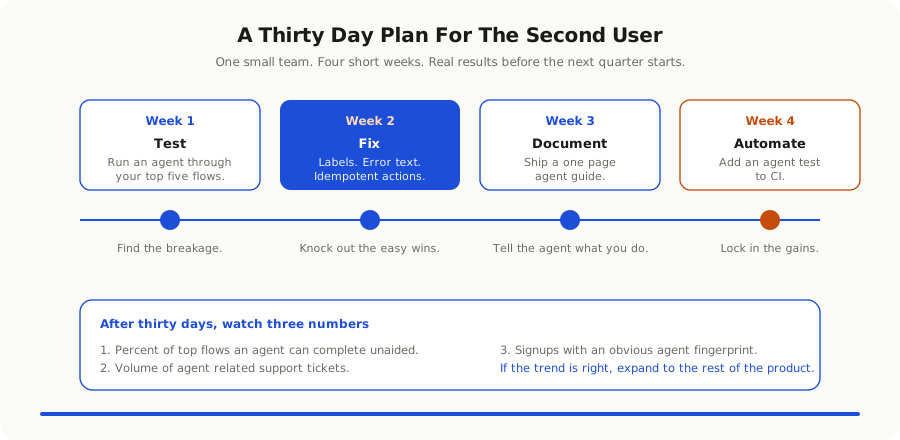
In the first week, run an agent through your top five user flows. Pick a model, pick an agent harness, and let it try to complete each flow with a plain English instruction. Write down everywhere it failed, hesitated, or did the wrong thing. The list will be longer than you expect and shorter than you fear.
In the second week, fix the easiest items. Add labels to forms that need them. Make error messages persistent and clear. Stop hiding important controls in hover menus. Add idempotency to the actions that should not run twice. None of this is glamorous. All of it pays off.
In the third week, ship a minimal agent guide. A short markdown page that explains what your product does, the main objects, and how to perform the top tasks. Put it where an agent can find it. Most teams use a known path or a root file. Mention it in your MCP server description if you have one.
In the fourth week, write an agent test for one of those top flows and add it to CI. The bar is low. If the agent can complete the flow, the test passes. If it cannot, the build fails. Do not aim for full coverage. Aim for a single example that proves the workflow exists. Add more flows over time.
After the month, look at three numbers. The percentage of your top flows that an agent can complete unaided. The number of agent related support tickets, if you can identify them. The number of new accounts created with an obvious agent fingerprint. If those numbers move in the right direction, expand the work to the rest of the product.
The investment is small. The compounding is real. Every week, more users will reach for agents to use software, and every week more agents will quietly choose the tools that make their job possible.
The Bigger Pattern
Step back and the trend is not really about agents. It is about software finally having to deal with readers who are not human. The same pattern is showing up in three other places at once.
Search engines have been the first non human reader for a long time. Teams that took SEO seriously won. Teams that ignored it lost a decade of compounding traffic.
Voice assistants were the second wave. Most apps ignored them and that turned out to be the right call, because voice never quite arrived as a primary surface. Agents are not voice assistants. They are general purpose readers of your software, and the call to ignore them will not age the same way.
Internal AI tools at your customer's company are the third reader. The procurement team that used to read your sales deck now asks an internal AI to summarize it. The compliance team that used to read your security questionnaire now asks an AI to find the gaps. Your written content is the input. Your written content has to hold up to a careful, literal reader.
The common thread is that every business product now has at least three readers. The human user, the customer's AI, and the user's own agent. Designing for one is no longer enough. Designing for all three is what defines a modern product team.
The good news is that designing for the second user is mostly good practice that we let slip when growth was easy. Honest HTML. Clear labels. Stable URLs. Idempotent actions. Real error messages. None of it is new. All of it is suddenly load bearing again.
The teams that fix these things are not making their product worse for humans. They are making it better. The same product that an agent can use without confusion is the same product that a tired user can use at midnight without confusion. The same labels that help a model help a person on their tenth meeting of the day.
The first user is not going anywhere. The second user has arrived and is going to keep showing up in larger numbers every quarter. The work to welcome them is small and the payoff compounds. Start this month. Your future support team and your future signup chart will thank you.
If you want to go deeper, our notes on [the MCP era](/blog/mcp-era-how-ai-is-learning-to-use-your-software) and [spec driven development](/blog/spec-driven-development-replacing-tickets-2026) cover the protocol layer and the workflow layer that sit on either side of this design shift. Together, they are how teams in 2026 are quietly rebuilding their products for a world with more than one kind of user.