A product manager I work with sent me a screen recording last month. In it, she asked an AI assistant to pull every overdue invoice from her billing tool, draft a polite reminder for each customer, and post a summary in the team channel. The assistant did all of it in under a minute. She did not write a single line of code. She did not open a single tab. She watched the work happen.
A year ago that demo would have been a stitched together hack. Today it is becoming the new normal. The reason is a quiet shift in how AI connects to the software around it. The shift has a name. Model Context Protocol, or MCP for short.
If you build software for a living, or you pay other people to build it for you, MCP is going to touch your roadmap soon. This post explains what it is in plain English, why it took off so fast, and what it means for your product. No machine learning background needed.
From Chatbot to Coworker
For a few years, AI inside products felt the same everywhere. There was a chat box. You typed a question. The model wrote a paragraph back. It was helpful in the same way a smart intern is helpful. It could think out loud, but it could not actually do anything.
Then we discovered tools. Developers learned how to let a model call a function, look up a record, send an email, or create a task. The chat box stopped being a place to ask and started being a place to act. The first wave of "AI agents" was born.
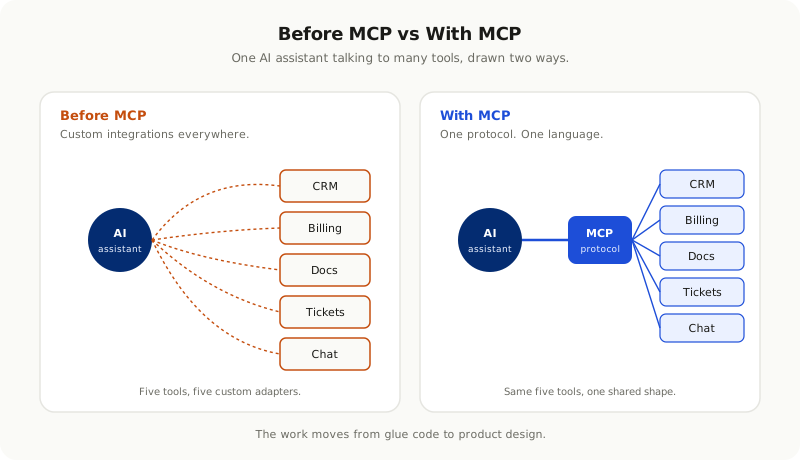
The trouble was that every team built this plumbing on their own. Every product had its own way of describing tools to a model. Every model had its own way of calling them back. If you wanted your AI feature to talk to ten different systems, you wrote ten different adapters. If a vendor changed something, your AI feature broke quietly. There was no shared language between the model and the rest of your stack.
That is the problem MCP solves.
What MCP Actually Is
Strip away the acronyms and MCP is a simple idea. It is a shared way for an AI model to discover what a piece of software can do, and to use that software through a clean, standard interface.
Think of it like USB for AI. Before USB, every device had its own connector. You needed a different cable for your printer, your mouse, your camera, your phone. After USB, you had one shape. Plug in any device, and the computer knew how to talk to it.
MCP works the same way. A piece of software, like your CRM or your internal admin panel, exposes a small list of capabilities through an MCP server. An AI assistant connects to that server, asks "what can you do," and gets a clear answer back. From that point on, the assistant can read data, run actions, and combine your software with any other MCP-enabled tool the user has connected.
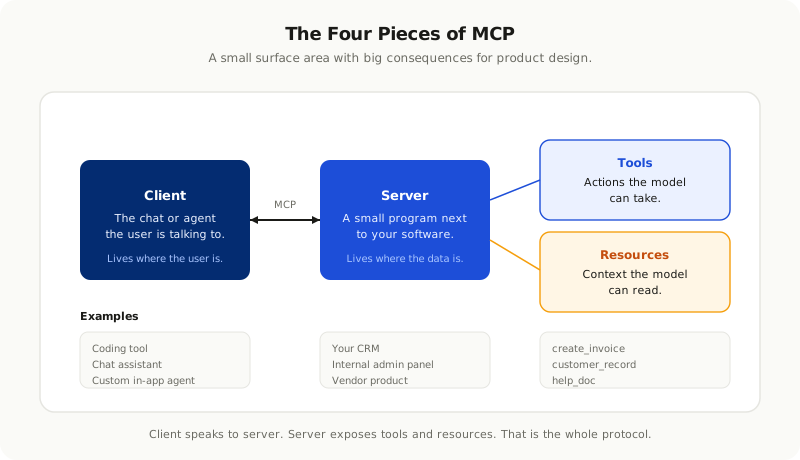
The pieces are easy to remember.
A **server** is a small program that sits next to your software and exposes its capabilities. You write one. The vendor writes one. Or the open source community writes one for you.
A **client** is whatever the user is talking to. A coding tool. A chat assistant. A custom agent inside your product. The client connects to one or more servers.
**Tools** are actions the model can take. Create a ticket. Send an invoice. Run a search. Restart a service.
**Resources** are pieces of context the model can read. Documents. Records. Files. Tables.
That is it. The whole shape of the protocol fits on one slide.
Why It Took Off So Fast
New protocols usually take years to catch on. MCP went from a fresh idea to a default in roughly twelve months. Three forces pushed it.
The first is fatigue. Every team that built an AI feature in 2024 and 2025 felt the same pain. Custom adapters. Brittle prompts. Vendor lock in. When a clean alternative showed up, people moved fast because they had been quietly suffering.
The second is the rise of agents. Once a model could plan, call tools, and check its own work, the cost of every extra integration started to matter. If your agent has to know about ten systems, ten custom integrations is a tax on every change. A common protocol turns that tax into a one time setup.
The third is timing. By 2026, almost every serious software company had at least one AI feature in production. The first wave was easy because the scope was small. The second wave is harder because the scope keeps growing. Teams need a way to add more without rewriting everything from scratch. MCP arrived right when that need became impossible to ignore.
The first wave of AI features was about answering. The second wave is about doing. Doing needs a shared language, and MCP became that language faster than anyone expected.
What This Means for Software Companies
If you sell software, MCP changes a few things at once.
**Your product becomes a tool, whether you plan for it or not.** Customers will start expecting their AI assistant to read from your app and act inside it. If you do not give them a clean way to do that, someone will build a scraping bot or a hacked together integration that you cannot control. You are far better off shipping a real MCP server with the actions you want exposed and the rules you want enforced.
**Your roadmap gets a new bucket.** Alongside features for human users, you now have features for AI users. Some of them are the same. Many of them are not. A human can read a confusing screen and figure it out. An AI needs structured data, clear names, and predictable actions. Building for both is a real engineering shift.
**Your competitors get a new way to lose to you.** The first products in any category to ship a polished MCP server are going to win the AI assistant integrations. Once a customer's assistant is wired to your tool, switching costs go up. Every action they take through the assistant deepens the moat.
**Your support and onboarding change.** When the assistant can see the user's account, walk them through a setup, and run actions on their behalf, the bar for what counts as good onboarding moves. The old way of writing help docs and hoping people read them is going to feel ancient very quickly.
None of this is a far future story. Some of the bigger players in CRM, project management, communications, and developer tools have already shipped MCP servers. The rest are building. The companies that wait will not be punished tomorrow. They will be punished in the quarter after, when their customers start asking why the assistant can do everything except work with their tool.
The Risks Nobody Is Talking About Loud Enough
The hype around MCP is real, and the value is real. So are the risks. A few of them deserve more attention than they get.
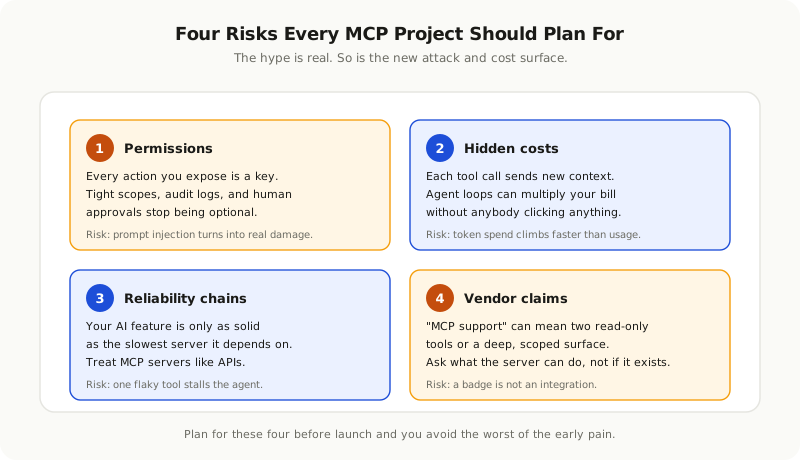
**Permissions are the new attack surface.** When an AI agent can read your data and take actions on your behalf, the question of "what is it allowed to do" becomes a serious security topic. A loose permission scope on an MCP server is the same as handing a stranger a copy of your house keys and asking them to be careful. Every action the assistant can take is a chance for a prompt injection attack to do harm. Tight scopes, audit logs, human approval for high risk actions, and rate limits stop being nice to have and start being non negotiable.
**Costs hide inside agent loops.** If your assistant calls three MCP tools to answer a question, and each of those tools sends back five hundred lines of context, your token bill is climbing without anybody clicking anything. Token costs and tool costs are now linked, and most teams do not yet measure them together. We wrote about [why token spending grows out of control](/blog/token-costs-are-the-new-cloud-costs-budgeting-ai-into-your-product) in detail. MCP makes that problem easier to ignore, not easier to solve.
**Reliability becomes a chain.** Your AI feature is now only as reliable as the slowest, flakiest server it depends on. If a third party MCP server is down, the agent stalls. If it returns malformed data, the agent gets confused. Good MCP servers behave like good APIs. They have timeouts, clear error messages, and predictable shapes. Hand rolled servers often have none of that.
**Vendor portrayals can be misleading.** "MCP support" is starting to appear on marketing pages with very different meanings. Some vendors expose two read only tools and call it done. Others expose hundreds of carefully scoped actions. Both wear the same badge. As a buyer, ask what the server can do, not whether it exists.
How to Make Your Software AI Ready
There is no need to rebuild your product. Most of the work is about exposing what is already there in a clean, safe way. A few patterns hold up across companies of every size.
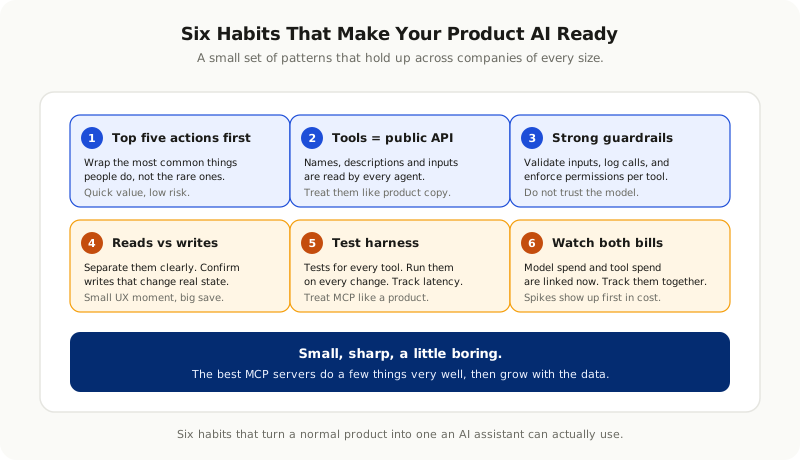
Start With the Top Five Actions
Look at the five things people do most often inside your product. Create a record. Update a status. Run a report. Send a message. Approve a request. These are the actions worth wrapping in an MCP tool first. They cover most of what an AI assistant will be asked to do, and they justify the engineering effort right away.
Treat Tool Definitions Like Public APIs
The names, the descriptions, and the input fields you give your tools are read by the model on every call. They are also read by your customers' agents and partner agents. Treat them like a public API. Pick clear names. Write short, concrete descriptions. Use consistent shapes. Sloppy tool definitions create sloppy agents and angry customers.
Build Strong Guardrails Into the Server
Do not assume the model will be careful. Inside your MCP server, validate every input. Enforce permissions on every action. Log every tool call with the user, the time, and the parameters. Add rate limits so a runaway agent cannot drain a customer's budget in an afternoon. The protocol is generous. Your server should not be.
Separate Reads From Writes
Reading data is low risk. Writing data is high risk. Keep the two clearly separated in your tool list, and require explicit user confirmation for actions that change state. A small UX moment of "are you sure" prevents a long debugging session later.
Ship a Test Harness
Treat your MCP server like a product. Write tests that exercise every tool. Run those tests on every change. Track latency, error rate, and unexpected outputs. The teams that get this right ship updates with confidence. The teams that skip it find out about regressions when a customer's assistant starts misbehaving.
Watch the Two Bills Together
When you launch, watch your model bill and your tool bill side by side. If a single agent loop is calling your server thirty times per question, something is wrong upstream. Most early MCP issues show up first as a cost spike, not a user complaint. Catch them early and the rest of the work stays calm.
The Pattern That Wins
The best MCP servers we have seen so far share a personality. They are small, sharp, and a little boring. They do a few things very well. They do not try to expose every screen and every button on day one. They start with the actions that real users actually take, and they grow as the data shows what is missing.
The same teams treat MCP as a product surface, not a side project. They have an owner. They have a backlog. They have a changelog. They version their tool definitions and let customers know when shapes change. They behave like the team behind a public API, because that is what they are now.
The teams that struggle do the opposite. They ship a server in a weekend, never come back to it, and wonder why no agent works well against their tool. The protocol does not save you from neglect. It just makes the neglect more visible to the outside world.
A Sensible Way to Think About All of This
MCP is not a magic upgrade for your product. It is a connector. A clean one, finally, but still a connector. The product still has to be useful. The data still has to be clean. The actions still have to do the right thing. What changes is the audience for all of that. Until now, the audience for your software was a person in front of a screen. From here on, part of the audience is also an AI assistant working on that person's behalf, often in the background, often at speeds no human would match.
The teams that come out of this period strongest will not be the ones who shouted about MCP first. They will be the ones who quietly made their software easy for an assistant to use, the same way the best web companies made their pages easy for search engines to read a generation ago. Calm work. Consistent work. The kind of work that compounds.
If you are not sure where to start, start small. Pick one workflow that your customers ask about every week. Wrap it in a clean MCP tool. Watch how an assistant uses it. Learn from the rough edges. Then do the next one.
The era of AI talking only to humans is closing. The era of AI talking to your software is open. Show up with a clean door, and let it in.