Walk into any working engineering team in 2026 and the picture has changed. Editors look the same. Repos look the same. The people are the same. But there is now a quiet partner sitting next to every developer, finishing their thoughts, writing their tests, and sometimes opening pull requests on its own.
A year ago, AI coding agents were a curiosity. Today they are a fact of daily work. Cursor, Claude Code, Devin, Copilot, Windsurf, and others have moved from novelty to standard kit. Most of the conversation about them so far has been about founders shipping apps in a weekend. That story is real, and we covered it in our post on vibe coding.
This post is about something different. It is about how senior engineers in real teams, working on real codebases, actually use these agents now. What is working. What is not. And what an engineering leader should do if they want to roll these tools out across a team without breaking the things that already work.
What Changed Between 2024 and 2026
Two big things shifted.
The agents got smarter about your codebase. In 2024, an AI tool could write a function. In 2026, an agent can read your repo, find the file it needs to change, plan a multi step edit, run tests, and tell you what it did. The unit of work moved from a line to a task.
The trust gap closed enough to be useful. Senior engineers who refused to touch AI tools two years ago now use them every day. Not because the tools are perfect, but because the time saved on the parts they do well is now larger than the time lost to fixing the parts they do badly. That ratio finally tipped.
The result is a workflow shift that is quieter than the vibe coding wave but probably more important. The people who were already shipping production software are now shipping it differently.
Four Ways Senior Developers Actually Use AI Agents
Talk to enough engineers and a clear pattern shows up. Senior developers do not use AI agents one way. They use them in four distinct modes, often within the same hour, and they switch between them based on the task.
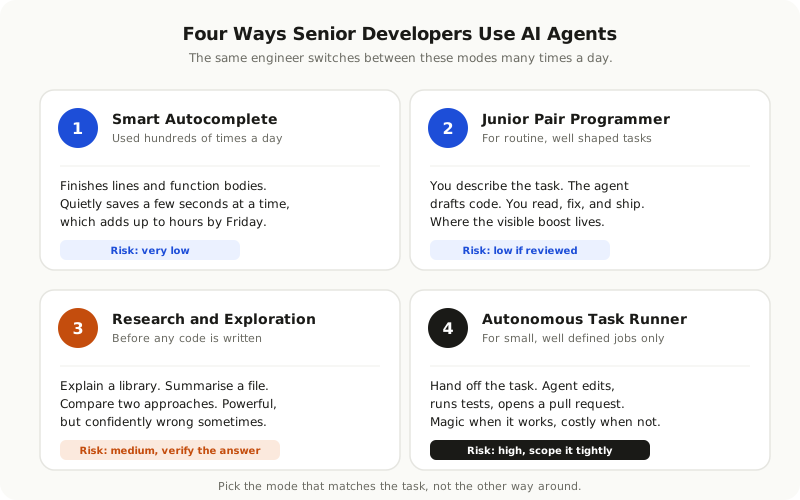
**Mode one: smart autocomplete.** The most common use. The agent finishes lines, completes function bodies, and suggests boilerplate. The engineer barely notices. They tab to accept, or keep typing. This is where the time saved per use is smallest, but the total saving is largest because it happens hundreds of times a day.
**Mode two: junior pair programmer.** The engineer describes a task in a sentence or two. The agent writes a draft. The engineer reads it, fixes the mistakes, and ships. This is where most teams see the biggest visible boost, especially on routine tasks like adding a new endpoint or wiring up a form.
**Mode three: research and exploration.** Before writing any code, the engineer asks the agent to explain a part of the codebase, summarise a library, or compare two approaches. Used well, this replaces an hour of reading documentation with five minutes of conversation. Used badly, it produces confident wrong answers that send the engineer in the wrong direction.
**Mode four: autonomous task runner.** This is the newest mode and the most uneven. The engineer hands the agent a small, well defined task and walks away. The agent reads the code, makes the change, runs the tests, and opens a pull request. When it works, it feels like magic. When it fails, it tends to fail by spending an hour producing something that looks done but is subtly wrong.
The senior engineers we see getting the most out of these tools are the ones who know which mode fits which task. They use mode one constantly, mode two often, mode three carefully, and mode four only for tasks they could verify in five minutes themselves.
Where the Productivity Gains Are Real
Not every claim about AI productivity holds up. After two years of teams using these tools daily, some patterns are clear.
The biggest, most consistent gains are in:
**Writing tests.** Tests are repetitive, predictable, and easy to verify. Agents are very good at generating them, and engineers are very good at spotting when a test is wrong. Many teams have moved from fifty per cent test coverage to ninety per cent without spending more engineering hours.
**Boilerplate and CRUD code.** New API endpoints, form handlers, validation logic, database queries. The patterns repeat across projects. Agents save real time here, sometimes cutting hours off a feature.
**Migration and refactor work.** Changing a deprecated API, renaming a function across two hundred files, moving from one library version to another. These are tedious, mechanical jobs that humans hate and agents handle well.
**Reading unfamiliar code.** Onboarding a new engineer used to mean a week of reading. With a good agent and a real codebase, it can be cut to a day or two. The engineer asks questions, gets clear answers, and starts contributing faster.
**Documentation and inline comments.** Engineers rarely write documentation because it feels like overhead. Agents write reasonable first drafts that humans can quickly correct. Codebases that were undocumented for years are getting cleaned up.
The honest range of productivity gains we see in our own work and across teams we talk to is about twenty to forty per cent on the right kinds of tasks. Not the ten times claimed in vendor pitches, but real and measurable.
The teams that keep their gains tend to share one habit. They write down which tasks the agent handles well and which it does not, and they update that list every few weeks as the tools change.
Where the Gains Quietly Disappear
For all the good news, there are tasks where AI agents either fail to help or actively cost time. Senior engineers who are honest about this list usually mention the same five things.
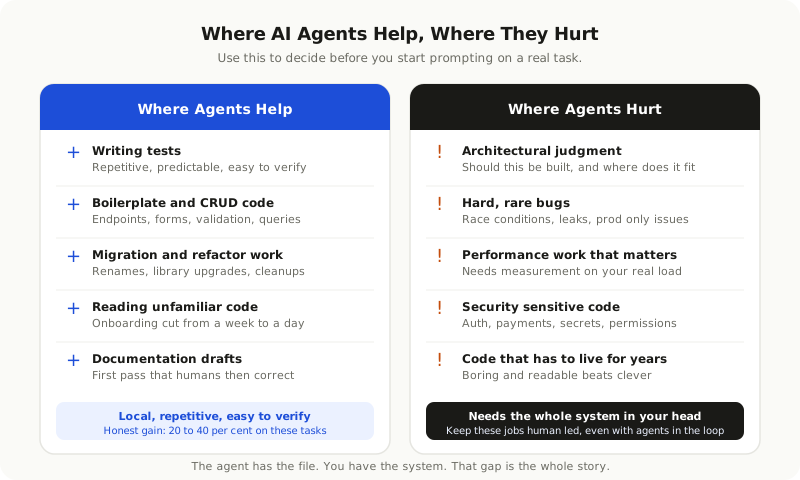
**Anything requiring real architectural judgment.** When the question is not how do I write this but should I write this at all, and if so, how does it fit into what we already have, agents struggle. They produce a confident answer that often misses the wider context. Architecture is still a human job.
**Debugging hard, rare bugs.** Race conditions. Memory leaks. Bugs that show up only in production with real traffic. Agents can sometimes spot the obvious cases. The hard ones still need a human who understands the full system, the history, and the strange behaviour you only learn from years of running it.
**Performance work that matters.** Making code faster requires measuring, hypothesising, testing, and measuring again. Agents can suggest optimisations but they cannot tell you which one will actually move the needle for your specific load pattern.
**Security sensitive code.** Authentication, payments, anything dealing with secrets. Agents will produce something that runs. They will not always produce something that is safe. The senior engineers we trust always review this kind of code line by line, the same as they did before.
**Code that has to be read for years.** A clever five line solution from an agent might be correct, but if no human on the team can explain it three months from now, it is a liability. Mature teams now ask for boring, readable code over clever one liners, because they know they will pay for cleverness later.
The pattern across all five is the same. The gains shrink whenever the task requires holding the system in your head. The agent does not have your head. It has the file.
The New Skills That Matter for Senior Engineers
The job did not disappear. It changed. The senior engineers who are getting more done with these tools have built up a few new habits.
**Writing prompts that are also specifications.** A vague prompt produces vague code. A clear prompt that names the file, the constraints, the edge cases, and the testing approach produces code you can ship. Good engineers now think about the prompt the way they used to think about a ticket.
**Reading code faster than ever.** Because agents produce a lot of code, and not all of it is good, the bottleneck moved from typing to reviewing. The engineers ahead of the curve have become very fast, very critical readers of generated code. They spot the wrong assumption in the second paragraph.
**Knowing when to throw it away.** A draft that needs more than ten minutes of fixing is usually faster to rewrite than to repair. Senior engineers learn to walk away from a bad draft early instead of trying to save it.
**Owning the architecture explicitly.** When the AI handles the small picture, the big picture matters more, not less. The engineers who stay valuable are the ones who can hold the whole system in their head and decide where each new piece fits.
**Sharing prompts and patterns with the team.** The best teams have started keeping a library of prompts that work for their codebase. New people pick those up and immediately benefit from what others have figured out.
How to Roll AI Agents Out Across a Team Without Chaos
A solo engineer can adopt these tools tomorrow with no risk to anyone else. A team of twenty cannot. Roll out badly, and you end up with code styles that drift, security policies that are quietly broken, and senior engineers spending their week cleaning up after AI generated pull requests.
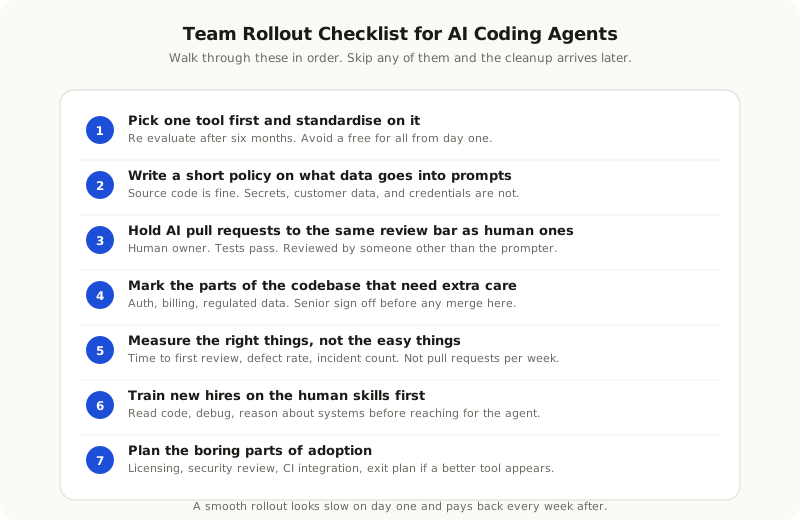
A few rules separate the smooth rollouts from the painful ones.
**Pick one tool first and standardise on it.** Letting every engineer choose their own creates a mess of styles and habits that is hard to reverse later. Pick one for the first six months. Re evaluate after.
**Write a short policy on what data can go into prompts.** Source code, fine. Secrets, customer data, production credentials, never. Put it in writing. Most leaks happen because people did not know.
**Define what counts as a properly reviewed AI generated pull request.** Same standard as a human one. A human owner. Tests that pass. A real review by someone other than the prompter. No exceptions for the AI wrote it so it must be fine.
**Mark the parts of the codebase that need extra care.** Auth, billing, anything regulated. Make a rule that AI agents can suggest changes here but a senior engineer signs off before merge.
**Measure, but measure the right things.** Pull requests per week is a bad metric because the easy way to look productive is to flood the queue with small AI generated changes. Better measures are time to first review, defect rate, and number of incidents traced back to recent changes.
**Train new hires on the human skills first.** Junior engineers who learn to lean on AI agents before they understand the basics will struggle when the agent is wrong. Make sure they can read code, debug, and reason about systems before you hand them the keys.
**Plan for the boring parts of adoption.** Licensing, security review of the tool itself, integration with your build pipeline, and a way to switch tools if a better one comes along. None of this is glamorous. All of it matters.
Signs You Are Getting It Right
After three to six months of serious use, the right signals are not everyone loves the new tools. They are quieter than that.
You ship roughly the same number of pull requests, but the average size goes up because routine work gets folded into bigger features. You spend less time on tickets you used to dread, like writing tests or migrating an old library. New engineers reach productive output faster than they used to. Senior engineers spend more of their time on the parts of the job that need a human.
You also see the warning signs early. Pull requests that pass review but break in production. A creeping inconsistency in style. Engineers who cannot explain code they shipped last week. If any of those show up, slow down, fix the process, and push back on speed for its own sake.
Where This Is Heading by 2027
The tools are still moving fast. By next year we expect three shifts that engineering leaders should plan for now.
Agents will get genuinely good at autonomous tasks that take a few hours, not just minutes. The teams ready for this will have clear specs, strong tests, and review systems that can handle a higher volume of safe, predictable changes.
The line between a developer tool and an internal platform will blur. AI agents will be wired into your CI, your monitoring, your incident response, and your customer support. The companies investing in clean, well documented systems today will get more out of these integrations.
The biggest skill gap will not be using the tools. It will be deciding what to build, what not to build, and how to keep the system understandable as it grows. In other words, the things senior engineers were always best at, only more so.
The Honest Take
AI coding agents are not the end of software engineering. They are also not just hype. They are a real shift in how the work happens, and the teams that take them seriously now will have a measurable edge in two years.
The shift is not humans out, agents in. It is humans up the stack, agents on the keyboard. The teams that win will treat the agent as a junior team member who can do a lot but cannot hold the whole picture, and will keep building the human skills the agent still cannot fake.
If you are thinking about how to roll these tools out across your team, or how to hire engineers who already work this way, this is exactly the kind of work we help our clients with. The tools are easy to install. The workflow takes more thought. We are glad to share what has worked.