At some point, every growing business hits a wall with generic tools. Maybe Airtable keeps hitting row limits. Maybe a Zapier chain that was supposed to be temporary has grown into a 50-step workflow that no one fully understands anymore. Maybe you have been trying to add a feature for six months and the platform just cannot do it.
When that moment comes, the question is usually framed as: no-code or custom software?
It is the right question, but the framing makes it harder than it needs to be. This is not a permanent either-or choice. It is a sequencing question. And once you understand that, the decision gets much clearer.
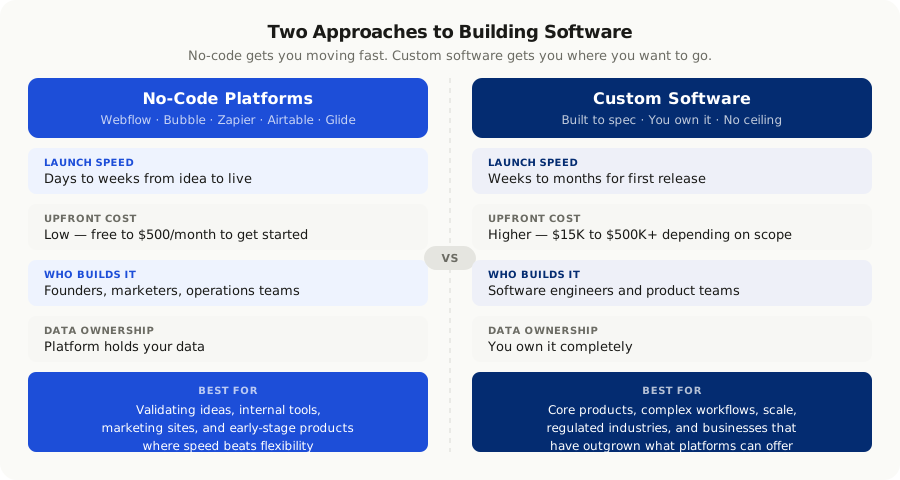
What No-Code Actually Means
No-code platforms let non-technical users build applications using visual, drag-and-drop interfaces. You configure behavior rather than write logic. Popular tools include:
- **Webflow** for marketing websites and content-driven pages
- **Bubble** for web applications with user accounts and databases
- **Zapier and Make** for automating workflows between different apps
- **Glide and Softr** for building mobile apps from spreadsheets
- **Airtable** for database-driven internal tools and dashboards
- **Notion** for documentation, wikis, and lightweight project tracking
The appeal is real. A founder can go from an idea to a working prototype in a week. A marketing team can launch a campaign landing page without waiting on engineering. For the right problem, no-code is the fastest and cheapest path to something working.
What Custom Software Development Means
Custom software is built to your exact specifications. Development teams write code, design the data model, and build the system around your business processes rather than forcing your processes to fit inside a platform's constraints.
It takes longer and costs more upfront. But it gives you things no-code cannot:
- Complete data ownership with no third-party holding your records
- No artificial usage limits or pricing surprises as you grow
- Integration with any system at any depth, including legacy tools and custom APIs
- Behavior that matches your exact workflow, not the closest approximation the platform supports
How They Actually Compare
| Factor | No-Code | Custom Software |
|---|---|---|
| Time to first version | Days to weeks | Weeks to months |
| Upfront investment | Low ($0 to $500/month) | $15,000 to $500,000+ |
| Ongoing costs | $100 to $5,000/month (scales with usage) | Hosting plus maintenance |
| Customisation ceiling | Platform limits apply | Unlimited |
| Scalability | Constrained by platform | Scales to your needs |
| Data ownership | Platform controls your data | You own everything |
| Integration depth | Pre-built connectors only | Any system, any depth |
| Vendor lock-in | High | None |
| Security control | Platform handles it | You control it |
When No-Code Is the Right Choice
No-code is not a compromise. It is the right answer in specific situations.
**You are validating an idea.** Before spending $80,000 building a custom platform, prove there is demand. Build a Bubble app, talk to users, and learn what they actually need. Then build the real thing once you know what it needs to do. Most ideas change significantly during early user testing, so spending less on the first version is usually wise.
**The use case fits the tool.** Webflow is exceptional for marketing websites. Airtable is excellent for tracking internal processes. Zapier handles routine integrations cleanly. When your requirement matches what the tool was designed for, no-code is the smart move. Do not over-engineer what does not need engineering.
**Speed matters more than flexibility right now.** Launching two months earlier can be the difference between capturing a market window and missing it entirely. If the platform can do 90% of what you need, that trade-off is often worth taking in the short term.
**It is an internal tool used by a small team.** A ten-person team tracking leads in Airtable does not need a custom CRM. A marketing team automating report generation in Zapier does not need a custom data pipeline. Keep it simple until simplicity breaks.
When Custom Software Is the Right Call
There is a point where no-code becomes the problem rather than the solution. You will recognise it when it happens.
**Your product is the software.** If what you are selling is the software itself, or if software is the core mechanism of your service delivery, you cannot be constrained by a third-party platform's roadmap, pricing decisions, or feature limits. You need to own it completely.
**You have hit the platform ceiling.** You are writing complex workarounds. Workflows have become difficult to maintain. New requirements keep running into platform limitations. Every time your team says "we cannot do that because of the platform," that is a signal. One signal is a rough edge. Several signals appearing together is a pattern worth paying attention to.
**Complex integrations are needed.** Pre-built connectors cover popular tools, but many businesses need to connect with legacy systems, proprietary APIs, or data pipelines that simply have no connector. Custom code handles anything; no-code platforms handle whatever they have been built to support.
**Data security and compliance matter.** In healthcare, finance, or any regulated industry, you need control over where data lives, how it is encrypted, who can access it, and how it moves between systems. No-code platforms make many of these decisions for you, and not always in ways that satisfy your compliance requirements.
**You are preparing to scale.** What works for 100 users often falls apart at 10,000. If your business model depends on growth, architecture decisions made now will determine what is possible later. Custom software lets you design for the scale you are heading toward rather than discovering the ceiling when you hit it.
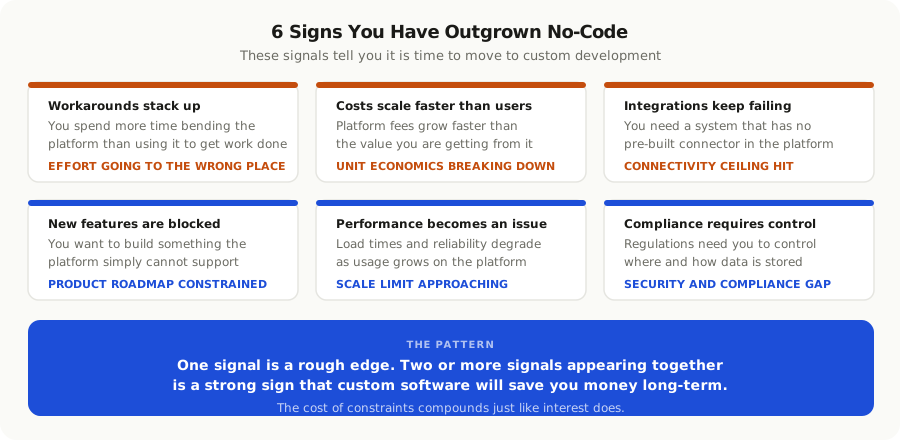
The Hidden Costs That Change the Calculation
No-code feels cheap until the bill arrives at scale.
**Subscription costs compound.** Most no-code platforms charge by seat count, record count, or API calls. A Bubble app serving 5,000 active users costs significantly more per month than a team of three using it internally. Run a three-year cost projection before making the no-code decision permanent.
**Migration is expensive.** Once your business logic, data, and workflows are built into a platform, moving away is painful and slow. You are either paying for that migration later in hard dollars, or you are paying for it now in the form of constraints you accept to avoid the migration cost.
**Workarounds have a price.** Every hour spent maintaining a 50-step Zapier workflow, debugging a broken automation, or building a workaround for something the platform cannot do natively is a hidden cost that does not show up on any invoice. These hours accumulate.
Custom software has its own hidden costs worth knowing upfront:
- The first version takes longer than planned, almost without exception
- Requirements change during development, which adds scope and cost
- Ongoing maintenance requires developer involvement
- Architectural decisions made early can constrain future options if not made carefully
The honest comparison is not day-one costs. It is total cost of ownership over three years, including the cost of constraints, migration risk, growth limits, and the hours your team spends working around platform limitations.
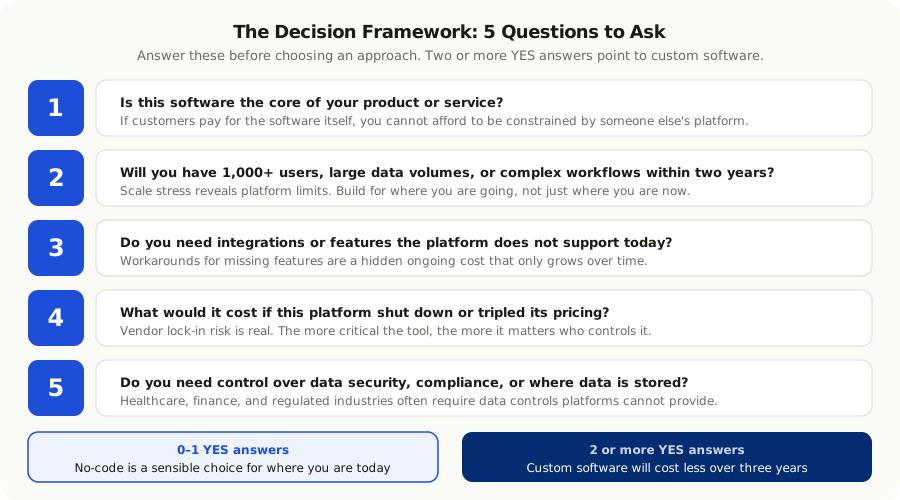
A Decision Framework That Actually Works
Before choosing, answer these five questions honestly.
- Is this software the core of your product, or is it a tool that supports your product?
- Will this system handle more than 1,000 users, large data volumes, or complex workflows within two years?
- Do you need features or integrations the platform does not support today?
- What would it cost if this platform shut down, raised prices by 3x, or changed its terms significantly?
- Does your use case require control over security, compliance, or where data is stored?
If you answer yes to two or more of those questions, custom software will almost certainly cost less over a three-year period, even though it costs more on day one. If you answer no to all of them, no-code is probably exactly right for where you are.
The Pattern That Works in Practice
The most successful teams tend to follow a recognisable sequence.
They start with no-code to validate the core idea quickly and cheaply. Once they understand what the product actually needs to be, they move specific, well-scoped parts of the system to custom software when they hit real constraints. They keep using no-code for everything that still fits.
This is not no-code failing. It is no-code doing exactly what it is designed for: getting you to working software fast so you learn what you actually need to build properly.
The teams that struggle are the ones that treat no-code as a permanent solution for a core product, or the ones that jump straight to custom software before they know what they are building. Both mistakes are expensive, just in different ways.
At Angrio, we work with teams at both stages. Some need help moving a production system off a platform they have outgrown. Others are building something new and want to make the right architecture decision from the start. The question we always ask first is the same: what does this system need to do in three years, not just today? That answer usually makes the right path obvious.
What to Do Next
If you are evaluating this decision for a specific project, the most useful thing you can do right now is write down what the system needs to do in three years, not just what it needs to do today.
If that future state fits comfortably inside what a no-code platform supports, use it and move fast. If it does not, build for where you are going rather than where you are.
And if you are not sure, that conversation is worth having before you commit to either path. The cost of a good early decision is much lower than the cost of a migration you did not plan for.