A founder I work with showed me his AI bill last quarter. It was bigger than his AWS bill. The product worked fine. Customers liked it. The team was proud of it. But every new feature was making the bill grow faster than the revenue. He kept asking the same question. Do we really need the biggest model in the world for every tiny task in our app.
The honest answer was no. About eighty percent of the calls his app made to a frontier model were doing simple work. Classifying a support ticket. Pulling a date out of an email. Rewriting a short message in a friendlier tone. None of that needs the smartest AI on earth. It needs a model that can do one job well, fast, and cheap.
So we did something simple. We picked a small open source model, ran it on a tiny server next to the app, and routed the easy work to it. The frontier model was still in the loop for the hard cases. The bill dropped by more than half in the first month. The product got faster too, because the small model answered in a few hundred milliseconds instead of a few seconds.
That is the quiet shift happening across the industry in 2026. The race to use the biggest model is over. The race to use the right size model is on. Welcome to the era of small language models.
What a Small Language Model Actually Is
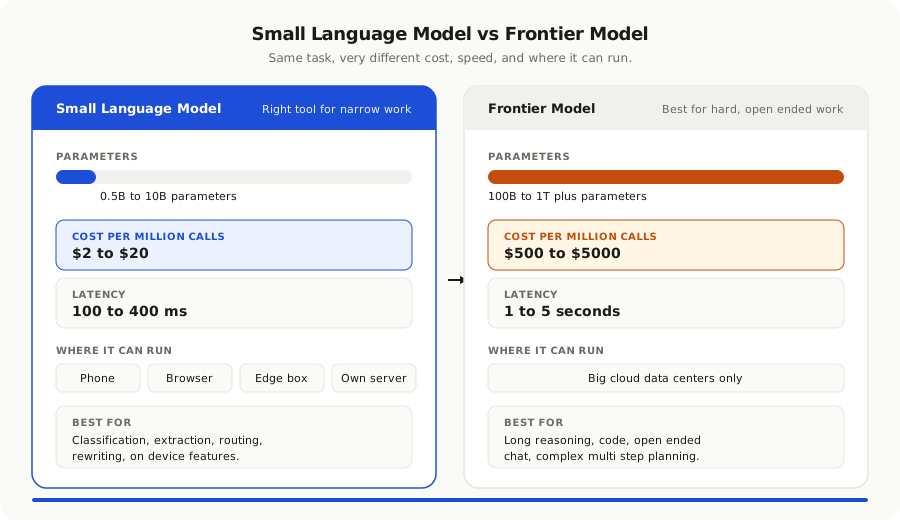
The name is doing a lot of work, so let me be clear. A small language model, or SLM, is just an AI model with fewer parameters than the frontier giants. Where a top tier model might have hundreds of billions of parameters, a small one has anywhere from a few hundred million to about ten billion. That is still a big model by 2022 standards. By 2026 standards it is tiny.
The interesting part is what that smaller size unlocks. A model with three billion parameters can run on a single graphics card. A model with one billion parameters can run on a laptop. A model with under a billion parameters can run on a phone, in a browser, or on the edge device next to a factory machine. None of that is possible with a frontier model.
Smaller does not mean dumber. The new generation of small models, trained on better data with smarter techniques, can match or beat the giant models from two years ago on most everyday tasks. They will not write a novel or solve a hard math proof, but they will summarize an email, extract a field from a form, or classify a request with very high accuracy.
Think of them the way you think of a junior employee who is great at one job. They will not run the company. They will handle a thousand small tasks every day, faster and cheaper than anyone else, and free your senior people to focus on the work that actually needs them.
Why Smaller Is Winning in 2026
A year ago, the answer to almost any AI question in product was the same. Use the most powerful model and figure out the cost later. That made sense when the gap between the best model and the second best was huge. It does not make sense now. Four shifts changed the math.
The first shift is cost. The price of a frontier model call has dropped, but the price of a small model call has dropped much faster. For the kind of high volume, low complexity work most products do, a small model now costs a tiny fraction of a frontier model. When a feature runs millions of times a month, that gap turns into real money.
The second shift is speed. A small model answers in a fraction of the time a frontier model needs. For a chatbot, that feels like a snappy reply instead of an awkward pause. For an agent that has to call the model many times in a loop, the time savings stack up. The whole product feels faster.
The third shift is privacy and control. Many companies cannot send their data to a third party model. Healthcare, finance, defence, legal, and any business serving the European market all have rules about where data can go. A small model can run inside your own network, on your own machines, with no data leaving the building. That alone is reason enough for many teams to pick a small model even if it is slightly less smart.
The fourth shift is quality. The small models of 2026 are not the small models of 2024. Better training data, better techniques like distillation from larger models, and better fine tuning have closed the gap on most practical tasks. For narrow jobs, a well tuned small model often beats a giant general purpose model.
Put those four together and the conclusion writes itself. For most real product work, a small model is the better choice. Not always. Often.
Where Small Models Beat Big Ones
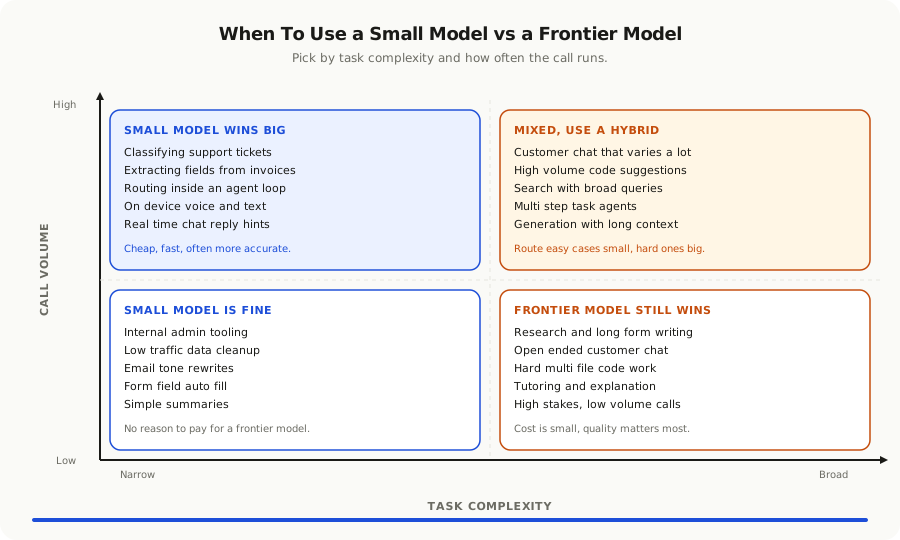
To make this concrete, here are the kinds of jobs where small language models tend to win in real products.
**Classification and routing.** Is this support ticket a billing question, a bug report, or a feature request. Is this email urgent. Is this comment toxic. A small model trained on a few hundred examples can do this faster, cheaper, and often more accurately than a frontier model.
**Extraction.** Pull the date, the amount, and the company name out of this invoice. Find the customer ID in this support message. Get the medication and dosage out of this prescription. These narrow extraction jobs are perfect for small models, because the task is well defined and the right answer is short.
**Rewriting and tone.** Make this message friendlier. Make this summary shorter. Translate this short text. Convert this rough note into a polite email. The shape of the input and the output is clear. A small model handles it well.
**Search and retrieval helpers.** Decide which of these five documents is most relevant to this query. Decide whether to call a tool or not. Decide which tool to call. These small decision steps live deep inside an agent loop. They run many times per user request. Using a frontier model for each of them is wasteful and slow.
**On device features.** Anything that runs on the user's phone, laptop, browser, or edge device. Offline notes, smart keyboards, in app suggestions, image and voice captions, factory floor inspections. The frontier models simply cannot run there. Small models can.
**Voice and conversation in real time.** A voice product cannot wait two seconds for a reply. A small model can answer in two hundred milliseconds. The conversation feels human. The conversation with a frontier model feels like a video call with bad lag.
The pattern is the same in every case. The job is narrow, the data is similar from call to call, and the answer is short. That is the home turf of a small model.
Where Frontier Models Still Win
This post is not an argument to throw away frontier models. They are still the right tool for a real list of jobs.
Long, open ended writing where the model has to reason across many pages of context. A frontier model holds the thread better.
Multi step reasoning where the model has to plan, change its mind, and recover from its own mistakes. Frontier models reason more reliably across long chains.
Code generation for non trivial work. Small models can finish a line or refactor a function, but writing a new feature across many files still leans on a frontier model in most teams.
Anything where the input could be almost anything and the user expects a polished, careful answer. Customer facing chat where every message is unpredictable. Research assistants that read whole reports. Tutors that explain hard ideas in different ways until the student gets it.
Tasks where the cost of being wrong is high and the volume is low. If you only call the model a few thousand times a month and a single wrong answer would embarrass you, the price difference does not matter. Use the best model you can.
A good rule of thumb is this. The narrower the task and the higher the volume, the more a small model makes sense. The broader the task and the lower the volume, the more a frontier model makes sense. Most real products have a mix of both, which is why the smart pattern is not picking one model. It is using both.
The Hybrid Pattern Smart Teams Use
The teams getting this right in 2026 do not run on a single model. They run on a small fleet, each tuned for a different job.
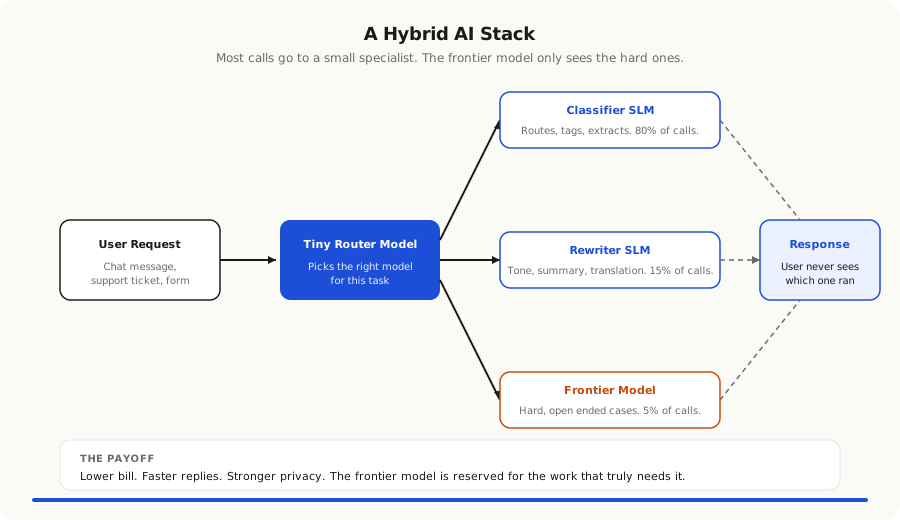
The pattern looks like this. A request comes in. A tiny router model, often less than a billion parameters, decides what kind of task it is. Easy and narrow tasks go to a small model. Hard or open ended tasks go to a frontier model. The result comes back through the same path, and the user never knows which model did the work.
In some teams the split is even finer. A specialist model for extraction. A specialist model for classification. A specialist model for tone. A medium sized model for code. A frontier model only for the cases where nothing smaller will do. Each model is good at its one job and ignored when the job is not its job.
This sounds complex, but it is mostly plumbing. The serving layer that picks the model. A small library of prompts and tool descriptions per model. An eval suite that tests each model against the kind of work it owns. None of this requires a research team. It requires a clear head and a willingness to stop treating every AI task the same way.
The payoff is huge. The same product that cost ten thousand dollars a month on a single frontier model can cost two thousand on a hybrid stack. The latency drops. The privacy story gets stronger because most calls now run on your own machines. The frontier model usage shrinks to the cases that genuinely need it, which is exactly where you want your most powerful tool focused.
How to Start Without Rebuilding Everything
You do not need to rip out your current AI setup to begin. You can start the same week you finish reading this post.
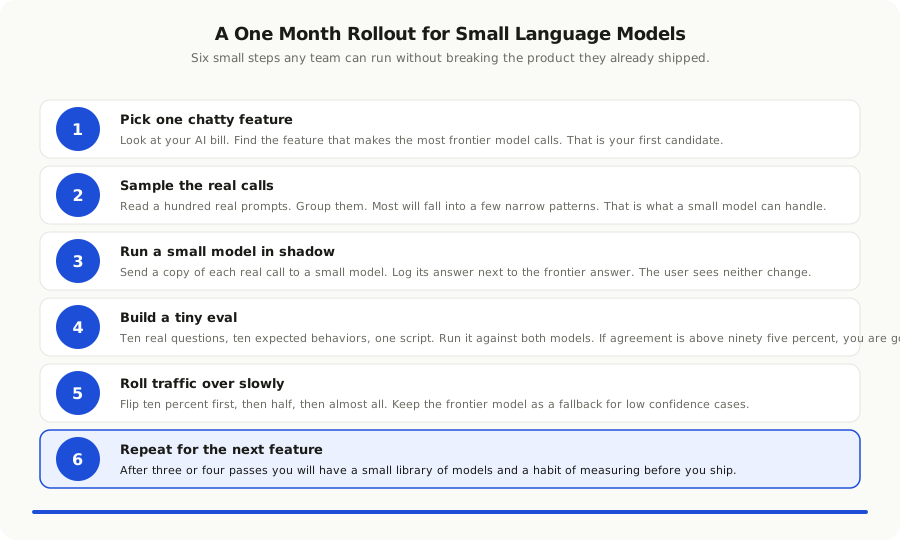
Pick one feature in your product that calls a frontier model a lot. Look at a sample of the last thousand calls. You will almost always find that most of them are doing one of three things. Classifying something into a few buckets. Extracting a few fields from a short input. Rewriting a short piece of text. Each of those is a candidate for a small model.
Pick a small open source model that has a good reputation for your task. There are good options now from many labs, both open and commercial. Run it on a single cheap server, or on a managed inference service if you do not want to manage hardware. Wire your feature so a copy of every real call also goes to the small model in shadow mode. The user never sees the small model output. You just log it next to the frontier model output.
Run that shadow for a week. Compare the two outputs on a real evaluation set. If the small model agrees with the frontier model on more than ninety five percent of cases, you have a winner. Flip the traffic over slowly. Ten percent, then half, then almost all. Keep the frontier model as a fallback for the cases where the small model is not confident.
Once you have done this for one feature, the next one is easier. After three or four features, you will have a small library of models, a routing layer, and a habit of evaluating before you ship. That library compounds. Every new feature can start with a small model first and only escalate to a frontier model if it has to.
If you are already practicing [context engineering](/blog/context-engineering-replacing-prompt-engineering-2026), this fits right in. The model is just one layer of the context. Picking the right size model is part of designing the brief. You do not feed a five course meal of context to a model that only needs a note.
Where Teams Get This Wrong
I have watched a lot of teams try to move some work to small models. The same handful of mistakes keep coming up.
**Picking the smallest model they can find and hoping it works.** Smaller is not always better. A model that is too small for a task will fail in ways that are hard to predict, and the team will give up on small models in general. Start with a model that is big enough to do the job comfortably, then try going smaller only if the cost or the speed matters.
**Skipping the eval.** A small model on a new task without an eval is a guess. The team ships it, customers complain, and the team rolls back. Then they blame the model size, not the missing test. Even ten real examples scored by hand is enough to tell you whether a small model is good enough.
**Treating the small model like a slot in the frontier model is sitting.** The same prompts and tools that work for a frontier model often need to be simpler and shorter for a small model. The small model has less headroom for clever instructions. Rewrite the prompts to be direct and concrete. Keep the tools focused.
**Ignoring the operational cost.** Running a small model yourself sounds cheap until you count the team time. If you do not have anyone to keep the inference server happy, use a managed service. The price per call is still much lower than a frontier model, and you keep your engineers building product.
**Forgetting privacy was part of the reason.** Some teams move work to a small model for cost, then send the same data to a frontier model anyway for the few hard cases. That defeats the privacy story for any regulator who is paying attention. Decide up front whether privacy is the goal. If it is, every fallback path has to honor it.
**Sticking with one model forever.** The small model that wins today will not be the best one in six months. The field is moving fast. Build your stack so swapping the underlying model is a small change, not a rewrite. Treat the model like a database driver, not like part of your business logic.
The Bigger Picture
There is a pattern in software that keeps repeating. A new tool arrives that is powerful, expensive, and centralized. Teams build everything on top of it. Then the tool gets cheaper, smaller, and easier to run. The work spreads out. Mainframes gave way to PCs. Servers gave way to the cloud. The cloud is giving way to the edge. AI is following the same path.
In 2023 and 2024, most AI work happened on a few giant servers run by a few giant companies. By 2026, AI work is starting to happen everywhere. On the user's phone. On a tiny box in the factory. On a single server in your own data center. On a developer's laptop. The frontier model is still there, but it is the rarest call in the system, not the default one.
This matters for product teams in three ways. The cost of building AI features keeps falling, so you can ship more of them. The privacy story keeps getting better, so you can sell to more regulated customers. And the dependency on any one model provider keeps shrinking, so you can move faster than your competitors who picked a single horse and bet on it.
The teams who get this early will spend the next year shipping AI features that feel free, fast, and private. The teams who keep routing every call to the biggest model in the world will spend the next year explaining their bills.
If you want one thing to take from this post, take this. Stop asking which is the smartest model. Start asking which is the right size model for this job. Most of the time, the answer is smaller than you think. The product is better for it. The bill is better for it. Your customers are better for it.
The future of AI in your product is not one giant brain doing everything. It is a small team of specialists, each doing one job well, with a single senior expert on call for the hard cases. That is how good companies are run. It turns out that is how good AI products are run too.