A product manager I have known for years sent me a screenshot last month with two words attached. Watch this. The screenshot was a chat with her own company's AI feature. She had asked it to draft a follow up email to a customer named Priya. The product cheerfully asked her who Priya was. It had answered the same question three days earlier. It had answered it three days before that. It had answered it on the day she onboarded.
Her team had shipped a brilliant assistant that knew nothing about the people using it. Every visit was a first date. Every preference was new. Every project name had to be explained again. Internally they called it the goldfish, because it remembered nothing past the current screen.
She is not alone. Across the AI products I have looked at this year, the same pattern shows up. The model is fast, the answers are good, the design is clean, and the feature still feels strangely impersonal. The reason is almost always the same. There is no memory layer. The product is brilliant in a single session and a stranger in the next one.
By the end of 2026, I think memory will be the line between AI features people love and AI features they quietly stop opening. This post is about why memory is the missing layer in most AI products, what useful memory actually looks like, and a small set of patterns we have seen work without breaking the trust the feature needs to earn.
Why AI Features Have Amnesia
The reason most AI features forget is not that engineers do not care. It is that memory is the part of the product that nobody owned during the first wave of AI shipping.
When teams added an AI feature in 2024 and 2025, the focus was on getting the model to answer well. The chat box worked. The summary was readable. The draft email was usable. Shipping that took most of the quarter. By the time the team thought about what happened between sessions, the feature was already live and the roadmap was already full.
The model itself does not help. A large language model has no idea who the user is. It has no idea what the user asked last Tuesday. It only knows what you put in front of it in this exact call. If your product does not feed it the context, it will answer as if every user is a new user, every time. That is not a bug in the model. It is a missing piece of the product around it.
There is also a quieter reason. Memory is hard to do well. It is easy to store every message a user has ever sent and call that memory. The hard part is deciding what to keep, what to discard, what to surface, and what to forget on purpose. That work falls between product, engineering, and data. It is the kind of work that needs an owner and almost never has one in the first version of an AI feature.
The result is a market full of impressive demos and unimpressive long term experiences. The product wows you on day one and feels indifferent by day thirty. The user does not write a bad review. They just stop opening it.
What Memory Actually Means in a Product
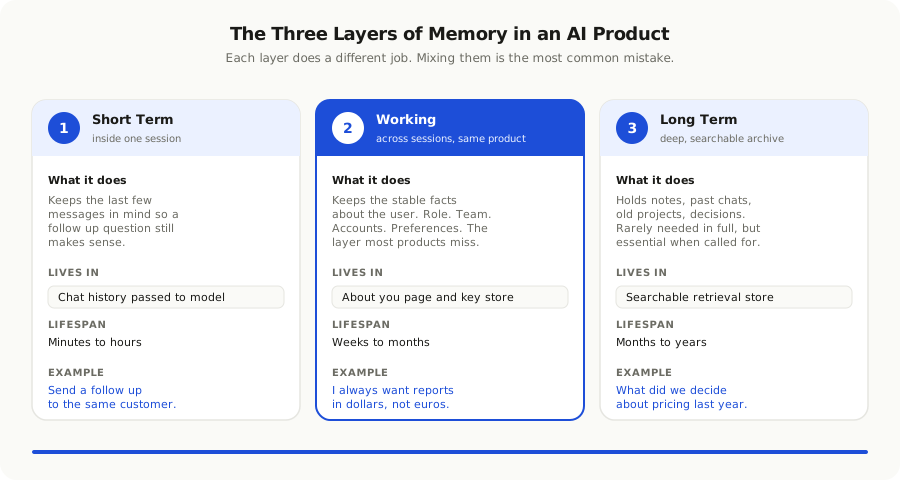
Memory in an AI product is not one thing. It is at least three things, and most teams trying to build it confuse them. Once you separate them, the design choices become a lot clearer.
The first is **short term memory**. This is what happens inside a single session. The user asks a question, the assistant answers, the user follows up. The assistant has to know that the second question is about the same customer the first question mentioned. This is the easiest layer to build, and most teams already have it without thinking about it. It usually lives in the chat history that gets passed back to the model on every call.
The second is **working memory**. This is what the assistant should know about the user across sessions, but only inside the current product. Their role. The team they belong to. The customers they handle. The metric they always ask about on Mondays. The preferred tone for emails they draft. Working memory makes the assistant feel like a coworker who has been on the team for a few months. It is the layer that most products are missing, and it is the layer that makes the biggest difference.
The third is **long term memory**. This is the slower, deeper record. The notes the user wrote three months ago. The project that wrapped last quarter. The decisions the team made that still matter today. Long term memory is rarely needed in full, but it is essential when the user reaches for it. It usually lives in a searchable store that the assistant can pull from when a question reaches that far back.
The trap is treating all three as one bucket. Teams that do that either store too much, which makes every reply slow and expensive, or store too little, which makes the assistant feel forgetful. Splitting memory into these three layers lets each one do its job and lets the team make different decisions about cost, privacy, and retention for each.
Where Useful Memory Actually Lives
If memory is going to feel real, it has to live in places the user can see and touch, not only in a hidden vector store. The products that get this right tend to expose memory in three visible ways.
The first is a small **about you** page. A user can open it at any time and see a short list of facts the assistant has remembered. Their role. Their team. Their main projects. A few preferences. Each entry is one line. Each entry has a small button to remove it. This page is the trust contract. It tells the user, in plain language, what the product knows about them. If they do not like what they see, they can change it in one click.
The second is **inline memory**. When the assistant uses something it remembered, it says so. A small line under the answer reads something like, I assumed you wanted this in your usual tone, or, I used the metric you set last week. The user can click and see exactly what was used. This sounds small. It is not. It is the difference between a product that feels helpful and one that feels presumptuous.
The third is **automatic note taking**. The assistant quietly captures the facts that look durable. The user said their team is called the growth squad. The user always wants reports in dollars, not euros. The user prefers short answers over long ones. These notes appear in the about you page. The user can correct them or remove them. Over a few weeks, the page fills up with the things that make the assistant feel like it actually knows them.
These three surfaces sound like UI details. They are not. They are how the user finds out, slowly, that the product is paying attention. The assistant that simply remembers things in silence feels creepy. The assistant that shows its work feels trustworthy.
Memory without a surface is surveillance. Memory with a surface is service.
Where Teams Get Memory Wrong
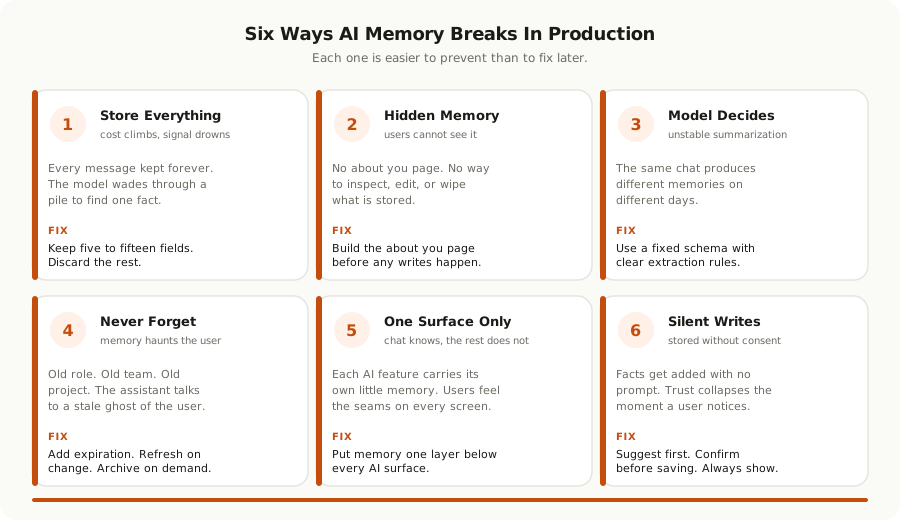
After watching dozens of teams try to add a memory layer, the same mistakes keep showing up. They are easy to make and easy to fix, but only if you spot them before they harden into the product.
**They store everything.** The first instinct is to keep every message, every preference, and every context in one big pile. The model then has to wade through the pile on every call. The answers get slow. The token bill gets ugly. The relevant fact often gets lost in the noise. Useful memory is small, opinionated, and curated. Most of what the user said yesterday is not worth keeping.
**They store nothing the user can see.** A memory layer that the user cannot inspect, edit, or wipe is a privacy problem waiting to happen. The first time a customer asks, what do you know about me, the team has to scramble to build the answer. Better to build the about you page first and let memory grow inside it from day one.
**They confuse memory with personalization.** Personalization is showing the right content. Memory is remembering the right facts. A product can have one without the other. The teams that conflate the two often end up with neither. They tune a recommendation model when what the user wanted was for the assistant to stop asking their job title every Friday.
**They let the model decide what to remember.** This is tempting and almost always wrong. A model asked to summarize a conversation will keep different things on different days. The same user will end up with a different memory depending on which call ran the extraction. Useful memory needs rules. The team should decide which facts are worth keeping, what schema they live in, and how they get updated.
**They forget to forget.** Memory that grows forever turns into a haunted house. The user changes jobs. The customer churns. The project ends. The preferences shift. A good memory layer has a built in way for facts to expire, get archived, or get replaced. Without that, the assistant slowly drifts into a version of the user that no longer exists.
**They tie memory to one feature.** The chat box has memory but the rest of the product does not. The summary tool knows things the email drafter does not. Each surface ends up with its own little memory. The user feels the seams every time. Memory should sit one layer below the features, so any AI surface in the product can read and write to it.
A Pragmatic Way to Add Memory
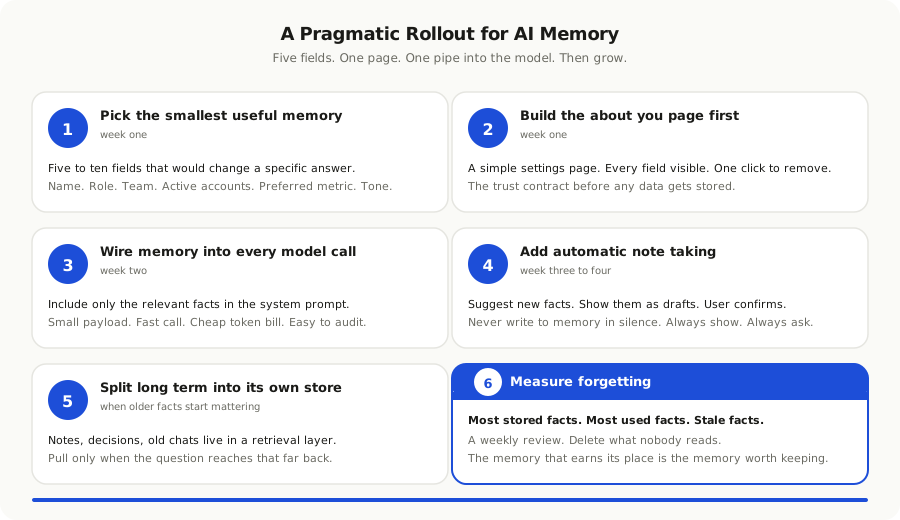
You do not need a memory framework or a vector database vendor to start. You need a small, well chosen set of facts, a place for the user to see them, and a clean way to read and write them on every AI call. The teams we have seen do this well tend to follow a path that looks like this.
Start by picking the smallest memory that would change the product. For most B2B tools, this is a handful of facts. The user's name and role. The team or workspace they belong to. The accounts or projects they own. The metric or report they ask for most. Five to ten fields is plenty for the first month. If you cannot point at how each field will change a specific answer, do not store it yet.
Build the about you page before you build the writes. A simple settings page that lists the fields, lets the user fill them in, and lets them remove anything they do not want stored. The page is the trust contract. It also forces the team to be honest about what is being kept. If the about you page would feel uncomfortable to show a customer, the memory underneath is probably storing too much.
Wire memory into your model calls. On every call, the system prompt should include the relevant facts from the about you page. Nothing more. Pass the role, the team, the active project, the preferences that matter for the kind of answer you are giving. Keep the payload small. A few sentences of context is usually enough, and small payloads are fast, cheap, and easier to audit.
Add automatic note taking after the basics work. Once the about you page is live and being used, start letting the assistant suggest new facts to remember. The suggestions should always appear in the about you page first as a draft entry the user can accept or reject. Never write to memory silently. Trust is built one visible decision at a time.
Move long term memory into a separate store. When you start needing notes, decisions, or earlier conversations to come back into answers, that is the moment to add a retrieval layer. Keep it separate from the working memory above. The model should ask for long term context only when the question reaches that far back. This keeps the cost and latency of everyday calls low.
Measure forgetting. This is the step almost everyone skips. Every memory layer should have a way to track what is being remembered, what is being used, and what is going stale. A simple weekly review of the most stored facts will tell you whether your memory is useful or just noisy. The facts nobody reads are candidates to delete.
The Trust Problem
Memory is the part of AI product design where the trust math gets serious. The features that remember the most are the features that lose users the fastest if they get it wrong. There are a few small rules that the products we have seen earn long term use tend to follow.
Show every stored fact. If the user cannot see it on the about you page, do not store it. This is the simplest rule and the one most often broken. Hidden memory is the fastest path to a churn email.
Let the user delete in one click. Not three. Not a support ticket. One click that removes the fact and the entries that depend on it. The first time a user tries to wipe memory and the product makes it hard, they stop trusting it for everything else too.
Be honest about what you do not know. When the assistant cannot use memory because none exists yet, it should say so. A simple line at the end of an answer like, I do not know your usual format yet, want me to remember it, is far better than a confident guess.
Keep memory inside the boundary the user expects. A finance assistant should not remember things the user said inside a separate HR tool, even if they share a login. Cross product memory feels powerful in a demo and creepy in production. Start narrow. Earn permission to widen.
Make forgetting feel real. When a user removes a fact, every model call after that should treat it as gone. No echoes. No reappearances. No moment where the assistant says something only the deleted fact could have explained. That single moment, when it happens, ends the trust for good.
This is the side of memory that most teams underweight. They focus on the engineering of remembering. The trust comes from the engineering of forgetting, of showing, and of asking. The product that handles those three things gracefully will quietly become the one users open every day.
What Memory Unlocks Once It Exists
Once a real memory layer is in place, a few things become possible that were not before. They are worth describing because they tend to surprise teams who shipped memory thinking it was a small polish.
The first is that the assistant **stops asking the same questions**. The friction at the start of every session disappears. The user opens the product and the assistant already knows the basics. That single change moves the assistant from feeling like a stranger to feeling like a colleague.
The second is that **answers get personal without effort**. The model does not need a clever prompt to write in the user's tone or focus on the metric they care about. The memory layer puts those things in front of it on every call. The cleverness sits in the product, not in the prompt.
The third is that **proactive moments become possible**. When the assistant knows the user owns three accounts and one of them just changed behavior, it can quietly surface that on the next visit. Without memory, the proactive moment is impossible. With memory, it is one of the most powerful features the product can ship.
The fourth is that **the entire product gets smarter, not just one feature**. The same memory layer feeds the chat, the email drafter, the search box, and any new AI surface the team ships next quarter. The cost of each new feature drops because the context is already there. The team starts shipping AI features faster, not because the models got faster, but because the memory got better.
If you want to go deeper on the related work that sits underneath all of this, our pieces on [context engineering replacing prompt engineering](/blog/context-engineering-replacing-prompt-engineering-2026) and [why your data isn't ready for AI](/blog/why-your-data-isnt-ready-for-ai-and-what-to-fix-first) cover the surrounding plumbing in more detail. Memory does not work without clean context and clean data underneath. Build those first or build them together.
The Bigger Pattern
Step back from AI and the same shift is showing up in the rest of software. The products that win on long use are the ones that remember. The calendar that knows the meetings you usually skip. The bank app that knows which transfers you always make on the first of the month. The fitness app that knows you log runs after work and yoga before it. None of these are AI features in the strict sense. All of them feel personal because something behind the screen is paying attention.
AI features are now competing in that arena, whether they want to or not. The user does not separate the AI from the rest of the product. They expect the assistant to feel as personal as the calendar and as private as the bank. The teams that meet that expectation will look like they shipped something obvious. The teams that miss it will keep wondering why their feature feels colder than the rest of the product.
The good news is that memory is one of the few problems in AI where the engineering is mostly within reach. You do not need a frontier model. You do not need a new framework. You need a small, opinionated set of fields, a page where the user can see them, a clean way to feed them to the model, and the discipline to forget the rest. That is buildable in a quarter for most products.
The teams that win the next year will not be the ones with the most clever prompts or the biggest context window. They will be the ones whose products remember the boring, useful things about the people using them, and treat that memory with the same care they treat the rest of the user's data. The dashboard, the chat box, the inbox, the calendar, and now the assistant. The pattern is the same. The product that pays attention earns the next visit.
If your AI feature still asks who Priya is every Tuesday morning, you do not have a model problem. You have a memory problem. It is one of the most fixable problems in the whole stack, and it is the one most likely to decide whether your AI feature becomes a habit or a museum piece.