A founder calls us six months after launch. Their app is live. They have customers. They are growing. But their software bill has doubled, the team is fighting fires every week, and a small new feature now takes a month instead of a week. They want to know what went wrong.
Nothing went wrong, exactly. They simply ran into the part of software that no one warned them about. Building an app is the smaller bill. Keeping it running, safe, and useful is the larger one. Most teams find this out after they have already committed.
This post explains what software maintenance really covers, why the costs keep growing, and how to plan for it before you ship so the bill never surprises you.
The Launch Day Myth
Many teams treat launch as the finish line. It is closer to the starting line of a longer race. The first version of any software product is the smallest version it will ever be. From day one, the world starts pulling at it. Customers ask for new things. Devices update. Browsers change. Libraries get patches. Servers get attacked. Data grows.
Every one of those forces costs time and money to handle. A product that is not maintained does not just stand still. It slowly stops working.
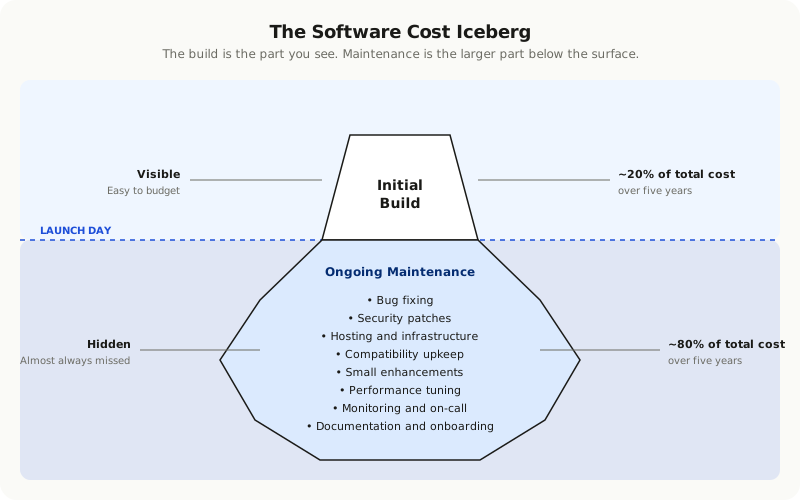
What Maintenance Actually Means
When most people hear the word maintenance, they think of bug fixes. That is one part of it, and the smallest part. Real software maintenance has five layers, and each one has its own cost.
**Bug fixing.** Things break. Users find paths you did not plan for. Edge cases show up that never appeared in testing. Some bugs are easy to fix. Others take days to track down because the cause is buried in some corner of the code nobody has touched in months.
**Security patching.** Almost every modern app is built on top of dozens of open source libraries. A few times a year, one of those libraries will have a serious vulnerability. You have to patch it fast or risk a breach. This work is not optional. It is not glamorous. It does not produce a new feature. But skipping it ends careers.
**Hosting and infrastructure.** Servers, databases, file storage, email delivery, analytics, error tracking. Each of these has a monthly bill that grows as your usage grows. Many of them also need ongoing tuning to keep costs sane and performance steady.
**Compatibility upkeep.** The world your app lives in changes. Apple releases new iPhones. Google changes Android requirements. Browsers retire old features. Payment providers update their APIs. If you do not keep up, parts of your app stop working and you find out from frustrated customers.
**Small enhancements.** The things that are not full features but still need an engineer. Copy changes. Adding a field to a form. A new email template. A small report. These are the constant background hum of running a real product, and they add up.
Why the Bill Keeps Growing
The first year of running an app is usually the cheapest. Then the costs start to climb, and most teams cannot explain why. Here is what is actually happening underneath.
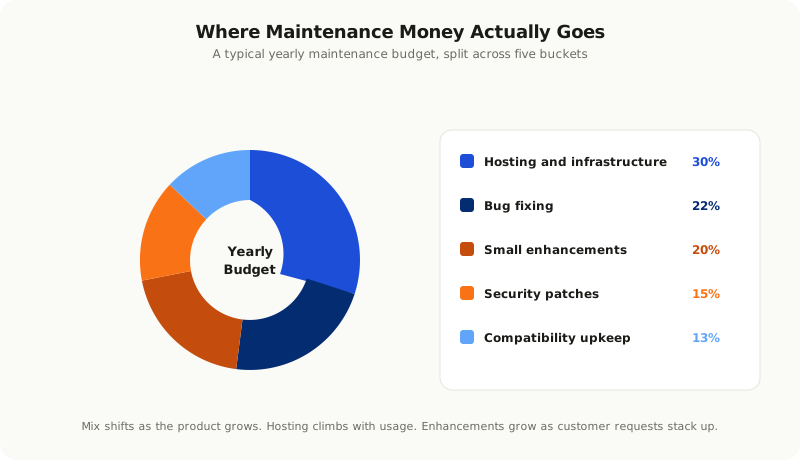
**More customers means more usage.** Your hosting bill grows with traffic. Your support load grows with users. Your data store grows with every new account. None of this is bad, but none of it is free either.
**Code grows in complexity.** Every new feature adds connections to the existing code. After a year, even small changes touch parts of the system you forgot about. What used to take an hour takes a day.
**Team turnover.** People leave. New people join. They need time to learn the codebase. The knowledge that lived in one developer's head leaves with them, and the next person has to rebuild it from scratch.
**External dependencies change.** A payment provider deprecates an API. A library you use stops being maintained. A service you depend on raises prices or shuts down. Each of these forces work you did not plan for.
**Customer expectations rise.** What was acceptable on launch day is not acceptable a year later. Users compare your product to the latest version of every other app they use. Standing still feels like falling behind.
Hidden Costs Founders Miss
Beyond the obvious line items, there are costs that do not show up on a clean spreadsheet but are very real all the same.
**Downtime.** Every minute your app is unavailable, customers lose trust. Some leave for good. The cost of an outage is rarely just the engineering hours to fix it. It is also the refunds, the support tickets, the apology emails, and the long tail of reputation damage.
**Slow performance.** A page that takes four seconds to load loses customers as fast as a page that does not load at all. Performance erodes silently. You only notice when your conversion rate drops or someone complains.
**Manual workarounds.** When the software cannot do something, a human ends up doing it instead. A staff member exports data manually every Monday. Someone copies orders between two systems by hand. These workarounds become invisible costs measured in salaries.
**Onboarding friction.** Bad code is slow to learn. If a new engineer takes three months to be productive instead of three weeks, the difference is paid in salary every day they ramp up.
**Lost opportunities.** Every hour spent fixing old problems is an hour not spent building new ones. If your team is always firefighting, you fall behind competitors who are not.
A Realistic Maintenance Budget
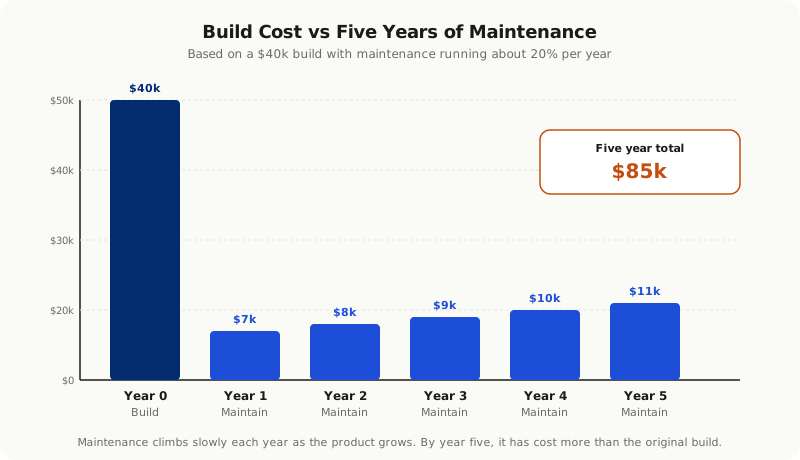
A common rule of thumb is that ongoing software costs run between fifteen and twenty five percent of the original build cost per year. So an app that cost forty thousand dollars to build will likely cost six to ten thousand dollars a year to keep healthy, on average.
That is the average. The real number depends on a few things.
**Complexity of the product.** A simple landing page with a contact form needs almost nothing. A multi tenant SaaS with payments, integrations, and a mobile app needs serious investment.
**Pace of change.** Are you actively adding features and growing? Then maintenance and development blur together, and the bill is higher. Are you in steady state? Then maintenance is leaner.
**Quality of the original build.** This is the one most people miss. A well built product is cheaper to maintain. A rushed product, or a vibe coded one, is more expensive every year for the rest of its life.
**Compliance and security needs.** A health app has higher ongoing costs than a recipe app, even if they look similar from the outside. Audits, certifications, and security reviews are real line items.
A product that costs forty thousand to build and ten thousand a year to maintain will cost ninety thousand over five years. That is not a flaw in the plan. That is the plan, if you make it on purpose.
How to Reduce Maintenance Costs Without Cutting Corners
You cannot make maintenance free. You can make it less painful and less expensive. The teams that get this right do a few things consistently.
**Invest in tests early.** A good test suite catches bugs before they reach customers. It also lets engineers change code with confidence, which makes every change cheaper. Skipping tests to ship faster is a loan with very high interest.
**Keep dependencies up to date in small steps.** Update libraries every month, not every two years. Small updates are easy. Two years of skipped updates is a project of its own, and a risky one.
**Document the parts that hurt to lose.** Not everything needs documentation. The few critical parts of the system, the ones that would take a week to relearn, deserve a clear write up that lives next to the code.
**Watch your error logs.** Many teams collect errors and then never look at them. A small weekly habit of triaging the top errors prevents most bigger incidents.
**Automate the boring work.** Deployments, backups, monitoring, alerts. If a person does it the same way every week, a script should do it instead. The time saved is paid back many times over.
When to Pay More Now to Save Later
There are points in a project where spending a little more upfront removes a lot of cost later. The tradeoff is almost always worth it.
**Picking proven technology.** A trendy framework that nobody else on your team knows will cost you for years. A boring, widely used choice is almost always cheaper to maintain.
**Building for the second user, not just the first.** Designing data models, permissions, and architecture as if more than one customer will ever exist saves a major rebuild later.
**Getting security right at the start.** Bolting on security after launch is more expensive than building it in. The same is true for logging, audit trails, and monitoring.
**Hiring engineers who have done it before.** A senior engineer who has built and maintained ten products is far cheaper over a year than a cheap team who is learning on your project.
How to Plan for Maintenance Before You Ship
The best time to plan for maintenance is before launch, while you still have flexibility and budget. Here is a short pre launch checklist that most teams skip and later wish they had not.
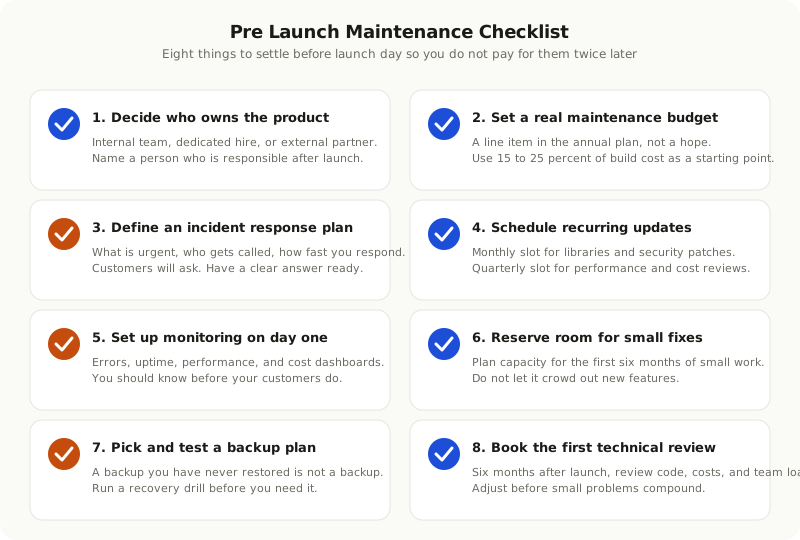
**Decide who owns the product after launch.** Is it the same team that built it? An internal hire? An external partner? Make this clear before launch day.
**Set a maintenance budget.** A real number, not a hope. Build it into your annual financial plan from year one.
**Define a response time for incidents.** What counts as urgent. Who gets called. How fast you promise to respond. Customers will ask. Have an answer ready.
**Schedule recurring updates.** A monthly slot for dependency updates and security patches. A quarterly slot for performance reviews. Put them on a calendar, not in someone's memory.
**Set up monitoring and alerts on day one.** Not later. The first time you find out about an outage from a customer, you will wish you had done this earlier.
**Plan the first six months of small enhancements.** Not features, just small improvements. Reserve capacity for them so they do not compete with new work.
**Pick a backup and recovery plan.** Test it. A backup you have never restored is a backup you do not really have.
**Set a date for the first technical review.** Six months after launch is a good rule of thumb. Look at performance, costs, code quality, and team workload. Adjust before problems compound.
Maintenance Is Part of the Product
The lesson from working with many teams is the same. The teams that thrive after launch are not the ones that built the cheapest product. They are the ones that planned for what comes after.
Software is not a building. You do not finish it and walk away. It is closer to a garden. It needs regular attention, the right tools, and a clear plan for the seasons. Treated that way, it stays healthy for years and keeps producing value. Ignored, it gets overgrown and expensive to recover.
If you are about to launch a product, take an hour to plan the next twelve months of maintenance. If you have already launched and the bill is starting to surprise you, the same hour spent now will save you many later.
The teams who avoid the maintenance trap are the ones who treat it as part of the product, not as something separate. That mental shift, more than any tool or framework, is what keeps software cheap to run and pleasant to use, year after year.